Hyperliquid Beginner Checklist - Start Trading in 10 Minutes
Table of Contents
 Hyperliquid
This is your complete roadmap from zero to first trade on Hyperliquid. No KYC, no sign-up forms, no waiting periods. Just a wallet, some USDC, and 10 minutes.
Every step below links to a detailed guide if you need more help. Bookmark this page and check off each step as you go. Brand new to all of this and want the friendly, plain-English version first? Read Hyperliquid for Dummies before you dive in.
Tip
New to Hyperliquid? Sign up through our referral link to get a 4% lifetime fee discount on every trade - it adds up fast. See our referral program guide for details.
Not sure how much to bring? How much money you need to start costs it out before you begin.
The 9-Step Checklist
Choose a Wallet
Pick an EVM-compatible wallet. Install the browser extension or mobile app.
Get USDC on Arbitrum
Buy USDC on a centralized exchange and withdraw to Arbitrum, or bridge from another chain.
Connect Wallet to Hyperliquid
Visit app.hyperliquid.xyz and connect your wallet.
Deposit USDC
Bridge USDC from Arbitrum into your Hyperliquid trading balance.
Learn the Interface
Understand the trading screen layout - charts, order book, position panel.
Place Your First Trade
Open a small position using a limit or market order.
Understand Fees
Know what you pay per trade and how to reduce costs.
Set Up Security
Protect your wallet and trading activity.
Explore Advanced Features
Vaults, leverage strategies, copy trading, and DeFi yield.
Step 1: Choose a Wallet
Hyperliquid is a decentralized exchange - you need a self-custody wallet to connect. No accounts, no passwords, no KYC.
Recommended wallets:
 Rabby - cleanest interface, excellent multi-chain support. Our top pick for beginners
 MetaMask - largest user base, works everywhere
 Coinbase Wallet - great if you already use Coinbase
 Phantom - popular with Solana users, supports EVM chains
 OKX Wallet - built-in exchange integration
 Trust Wallet - mobile-first option
Install your chosen wallet's browser extension (desktop) or app (mobile). Write down your seed phrase and store it somewhere safe - if you lose it, you lose access to your funds permanently.
Your wallet IS your Hyperliquid account. There is no separate registration. Whoever controls the wallet controls the trading account.
Step 2: Fund Your Account
Hyperliquid uses USDC as its settlement currency. There are several ways to get funds in:
- Deposit fiat directly (easiest for beginners) — Hyperliquid now supports credit card and bank transfer deposits via swapped.com. Select "Fiat" in the deposit modal — no crypto needed
- Buy on a centralized exchange (Coinbase, Binance, Kraken) and withdraw USDC to your wallet on Arbitrum
- Bridge from another chain — use the bridge guide to move funds from Ethereum, Solana, or 22+ other chains
If depositing USDC (methods 2-3), you also need a tiny amount of ETH on Arbitrum (less than $0.50) to pay for gas fees.
Step 3: Connect Your Wallet
Navigate to app.hyperliquid.xyz and click Connect in the top-right corner. Select your wallet from the list, approve the connection in your wallet popup, and you are in.
Make sure your wallet is set to the Arbitrum One network. Most wallets switch automatically, but if not, add Arbitrum manually using chainlist.org.
For detailed connection steps, see the wallet-specific guide linked in Step 1.
Step 4: Deposit USDC
Click the Deposit button on Hyperliquid. Enter the amount of USDC you want to deposit and confirm the transaction in your wallet. The full process is covered in our deposit USDC guide.
Key details:
- Zero deposit fees from Hyperliquid - you only pay Arbitrum gas (~$0.10-0.50)
- Deposits confirm in 1-2 minutes via the native bridge
- No minimum deposit enforced, but $50-100 is practical for trading
Your USDC appears in your Hyperliquid trading balance automatically once the bridge transaction confirms.
Get Your Fee Discount First
Connect through our referral link before your first deposit to lock in a permanent 4% fee discount on all trades.
Join HyperliquidStep 5: Learn the Interface
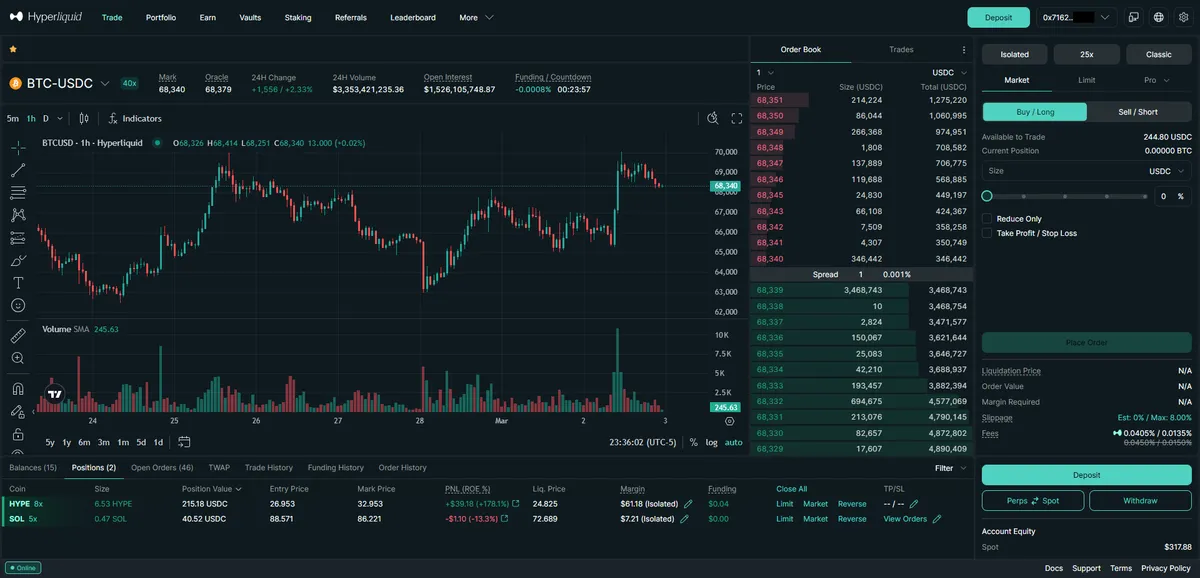
The Hyperliquid trading screen has four main areas:
- Chart (center) - price action with TradingView charting tools
- Order book (right) - live buy/sell orders and spread
- Order entry (right panel) - where you set order type, size, leverage, and direction
- Positions & orders (bottom) - your open positions, pending orders, and trade history
Spend a few minutes clicking around before placing your first trade. The how to trade guide walks through every element in detail.
Start with the Overview tab in your portfolio to see your balance, margin usage, and account health at a glance.
Step 6: Place Your First Trade
Ready to trade. Here is the simplest path:
- Select a perpetual market from the asset dropdown (BTC-PERP, ETH-PERP, etc.)
- Choose Market order type for instant execution
- Set your position size - start small
- Click Buy / Long or Sell / Short
- Confirm in the order popup
Your position appears in the bottom panel immediately. You can set a take-profit or stop-loss by clicking on the position row.
This checklist gets you set up; for the full first-hand, click-by-click walkthrough of placing your first order and managing the open position, follow how to trade on Hyperliquid. Want to learn about different order types? Read the order types guide.
Step 7: Understand Fees
Knowing your costs keeps you profitable. Hyperliquid's base fee tier:
| Taker | Maker | |
|---|---|---|
| Perps | 0.045% | 0.015% |
| Spot | 0.070% | 0.040% |
How to pay less:
- Use our referral link for a 4% lifetime discount
- Place limit orders (maker) instead of market orders (taker) - 3x cheaper
- Stake HYPE to unlock fee tier discounts of up to 40%
- Trade higher volume to move up VIP tiers
Read the full breakdown in our fees explained guide.
Step 8: Set Up Security
Your funds are only as safe as your wallet. Essential security steps:
- Never share your seed phrase - no legitimate service will ever ask for it
- Use a hardware wallet for large balances (Ledger or Trezor connected through MetaMask or Rabby)
- Enable transaction simulation - Rabby does this by default, showing you exactly what each transaction does before you sign
- Bookmark app.hyperliquid.xyz - never click links from DMs or social media
- Consider a VPN for privacy - see our best VPN for crypto trading guide
For a comprehensive security setup, read the crypto trading security guide.
Most crypto losses come from phishing and seed phrase theft, not exchange hacks. Protecting your wallet is the single most important thing you can do.
Step 9: Explore Advanced Features
Once you are comfortable with basic trades, Hyperliquid has much more to offer:
- Leverage trading - trade with up to 50x leverage on major pairs
- Spot trading - buy and sell tokens directly on Hyperliquid's spot markets
- Vaults - deposit into actively managed vaults run by top traders
- Copy trading - mirror strategies from successful traders
- Shorting - profit from price drops
- DeFi ecosystem - explore
 Felix,
  HyperLend,
  liquid staking, and more on HyperEVM
 - Mobile trading - trade from your phone with the same interface
Quick Troubleshooting
Deposit not showing up? Wait 5 minutes. Check the transaction on arbiscan.io to confirm it went through. If it succeeded on-chain but is not in Hyperliquid, try refreshing or reconnecting your wallet.
Wallet won't connect? Make sure you are on Arbitrum One network, clear your browser cache, and try disabling other wallet extensions that might conflict.
Need more help? Browse our troubleshooting guides for common issues and fixes.
Ready to Start?
Join Hyperliquid with a 4% lifetime fee discount and start trading in minutes. No KYC, no sign-up, no waiting.
Start Trading NowFrequently Asked Questions
Most users go from zero to first trade in under 10 minutes. The slowest step is getting USDC on Arbitrum - if you already have it, the process takes about 2 minutes. Wallet connection is instant, and deposits confirm within 1-2 minutes via the native bridge.
No. Hyperliquid is a fully decentralized exchange with no sign-up, no KYC, and no identity verification. You connect a self-custody wallet and trade directly. Your wallet address is your account.
There is no enforced minimum deposit, but most beginners start with $50-$100 to have meaningful trading margin. You need a small amount of ETH on Arbitrum (a few cents) for gas fees when depositing. Hyperliquid itself charges zero deposit fees.
Rabby and MetaMask are the most popular choices. Rabby is recommended for its cleaner interface and multi-chain support. MetaMask has the largest user base and widest compatibility. Both work seamlessly with Hyperliquid on desktop and mobile.
Independent resource: Hyperliquid Guide is an independent, third-party resource operated by Concept211. It is not affiliated with, produced by, reviewed by or endorsed by Hyper Foundation, Hyperliquid Labs or any other Hyperliquid-ecosystem entity. "Hyperliquid" and related names and marks belong to their respective owners and are used here only to identify the platform this site documents. Read the full disclaimer.
Not advice: Nothing on this site is legal, tax, financial or investment advice. Descriptions of regulatory status, tax treatment and market availability are general information that varies by jurisdiction and changes over time. Confirm anything that matters to you with a qualified professional and against primary sources. Trading perpetual futures involves substantial risk of loss, and past performance does not indicate future results.
Disclosure: this site contains referral links. Signing up through the 4% lifetime fee discount link earns us a share of the trading fee Hyperliquid already charges, at no extra cost to you.
Ready to Start Trading?
Join Hyperliquid with our referral link and get a 4% lifetime fee discount. No KYC, no email - just connect your wallet and trade.
Start Trading - Save 4%