How to Trade on Hyperliquid: The Complete Beginner's Guide (2026)
Table of Contents
- What Is Hyperliquid and Why Are Traders Switching to It?
- What You Need Before You Start
- Step-by-Step: From Zero to Your First Trade
- Step 1: Set Up Your Wallet
- Step 2: Get USDC on Arbitrum
- Step 3: Navigate to Hyperliquid and Connect Your Wallet
- Step 4: Deposit USDC into Hyperliquid
- Step 5: Navigate the Trading Interface
- Step 6: Place Your First Trade
- Understanding Order Types on Hyperliquid
- Market Orders
- Limit Orders
- Stop-Loss and Take-Profit Orders
- Advanced Order Types
- Risk Management: How to Not Lose Your Account
- Rule 1: Start With Low Leverage
- Rule 2: Always Use Stop-Losses
- Rule 3: Size Your Positions Properly
- Rule 4: Understand Liquidation
- Rule 5: Start Small
- What I Learned Trading Hyperliquid for the First Time
- My Exact First Trade, Click by Click
- Depositing my first USDC
- Placing my first perp order
- Managing the open position
- Closing it out
- Common Mistakes New Traders Make on Hyperliquid
- 1. Using Too Much Leverage
- 2. Not Setting Stop-Losses
- 3. Trading Without a Plan
- 4. Overtrading
- 5. Ignoring Funding Rates
- 6. Forgetting to Apply a Referral Code
- Hyperliquid vs. Centralized Exchanges
- What to Do After Your First Trade
- Summary
Info
How to trade on Hyperliquid in 40 words: Install a Web3 wallet, send USDC to your wallet on the Arbitrum network, visit app.hyperliquid.xyz via a referral link, connect your wallet, deposit USDC into Hyperliquid, pick a market, set leverage, choose market or limit order, and confirm. Updated May 2026.
What Is Hyperliquid and Why Are Traders Switching to It?
Hyperliquid is a decentralized perpetual futures exchange that runs on its own custom Layer 1 blockchain. Unlike other DEXs that rely on liquidity pools or off-chain order matching, Hyperliquid operates a fully on-chain order book - the same model used by major centralized exchanges like Binance, but without the centralization. If perps are new to you, read how perpetual contracts work before placing a leveraged trade: funding, margin and liquidation all follow from that one mechanism.
Here is why traders are switching from centralized and other decentralized exchanges:
- Zero gas fees - Every trade, order placement, and cancellation costs nothing in gas
- Sub-second finality - Orders confirm in under one second, faster than most CEXs
- No KYC required - Connect a wallet and trade immediately, no identity documents needed
- Deep liquidity - Over $1 billion in daily volume across 100+ perpetual futures markets
- Non-custodial - You control your funds at all times through your own wallet (is Hyperliquid safe?)
- CEX-grade interface - Professional charting, order types, and portfolio management tools
- Lower fees than competing DEXs - See how Hyperliquid stacks up in our Hyperliquid vs dYdX and Hyperliquid vs GMX comparisons
If you have ever used Binance Futures or Bybit, the interface will feel familiar. The difference is that everything runs on-chain, you keep custody of your funds, and there is no corporate entity that can freeze your account.
What You Need Before You Start
Before placing your first trade on Hyperliquid, you need three things:
- A crypto wallet - Any EVM-compatible wallet works. Popular choices include MetaMask, Rabby, Phantom, Coinbase Wallet, OKX Wallet, or Trust Wallet.
- USDC on Arbitrum - Hyperliquid uses USDC as its settlement currency. You need USDC on the Arbitrum network to deposit.
- A small amount of ETH on Arbitrum - You need a tiny amount of ETH (less than $1) on Arbitrum to pay the gas fee for the one-time bridge transaction into Hyperliquid.
If you do not have a wallet set up yet, follow one of our wallet connection guides to get started. If you need to get USDC onto Arbitrum, our full walkthrough on depositing USDC before your first trade covers the bridge, the minimums, and the fees. New to trading terminology? Our Hyperliquid glossary explains every key term you will encounter.
Tip
Save 4% on Every Trade
Before you create your Hyperliquid account, apply our referral code for a 4% lifetime discount on trading fees. This cannot be added after account creation.
Get Your Fee DiscountStep-by-Step: From Zero to Your First Trade
1Set Up Your Wallet
If you do not already have a wallet installed, pick one and follow our step-by-step guide:
- MetaMask - The most popular EVM wallet. Great for beginners.
- Rabby - Security-focused with built-in transaction previews.
- Phantom - Multi-chain wallet popular with Solana and EVM users.
- Coinbase Wallet - Pairs seamlessly with your Coinbase exchange account.
- OKX Wallet / Trust Wallet - Mobile-friendly options.
Whichever wallet you choose, write down your seed phrase on paper - never store it digitally. This is the only way to recover your wallet if you lose access. For broader security best practices including VPNs and phishing protection, see our crypto trading security guide.
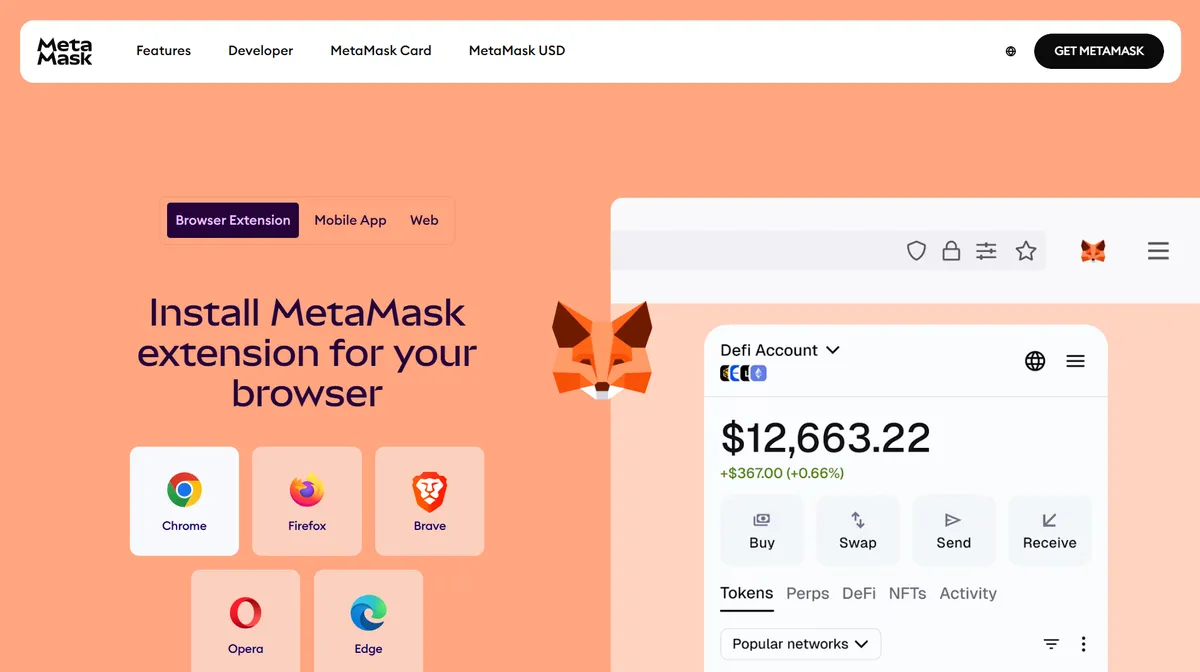 Wallet download and setup page
2Get USDC on Arbitrum
You need USDC on the Arbitrum network. Here are the most common ways to get it:
- From a centralized exchange: Buy USDC on Coinbase, Binance, or Kraken, then withdraw it directly to your wallet address on the Arbitrum network. This is the simplest method.
- Bridge from Ethereum mainnet: Use the official Arbitrum Bridge or a bridge like Synapse to move USDC from Ethereum to Arbitrum.
- Swap on Arbitrum: If you have ETH or other tokens on Arbitrum, swap them for USDC using Uniswap or another Arbitrum DEX.
Make sure you also have a small amount of ETH on Arbitrum (around $0.50 worth) to cover the bridge transaction gas fee into Hyperliquid. For detailed instructions on all deposit methods including third-party bridges and fiat on-ramps, see our complete bridge guide.
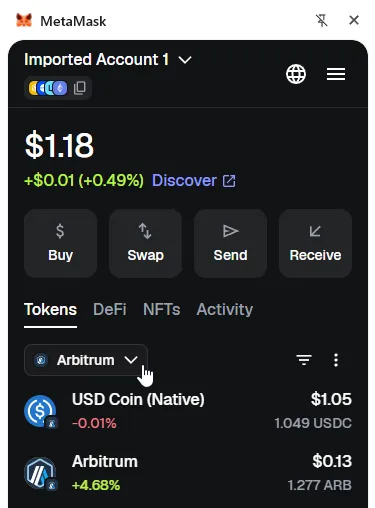 Wallet showing USDC balance on Arbitrum network
3Navigate to Hyperliquid and Connect Your Wallet
- Open your browser and go to app.hyperliquid.xyz — this works on desktop and as the Hyperliquid app on iPhone and Android
- Click "Connect" in the top right corner of the interface
- Select your wallet from the connection options
- Approve the connection in your wallet's popup
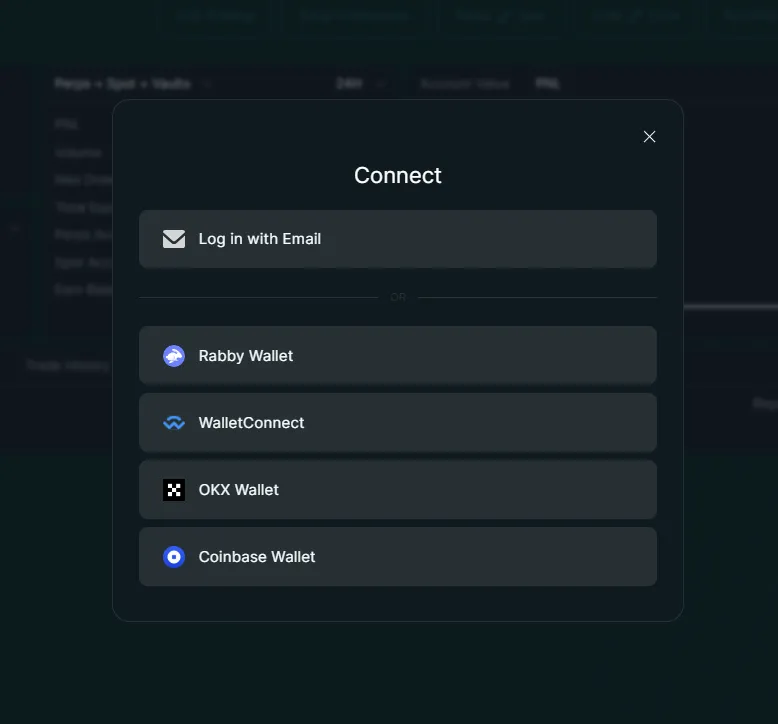 Hyperliquid connect wallet popup showing wallet options
Open Hyperliquid with 4% Fee DiscountImportant: If this is your first time, use a referral link to create your account. Our referral code (Concept211) gives you a 4% lifetime trading fee discount on your first $25 million in volume. This discount cannot be applied after account creation - it must be set during your first connection.
4Deposit USDC into Hyperliquid
Once your wallet is connected, you need to bridge your USDC from Arbitrum into Hyperliquid's L1:
- Click the "Deposit" button in the top navigation or portfolio section
- Enter the amount of USDC you want to deposit
- Click "Deposit" and confirm the transaction in your wallet
- Wait for the transaction to confirm - this typically takes 1-2 minutes
Your USDC balance will appear in your Hyperliquid portfolio once the deposit is confirmed. There is no deposit fee from Hyperliquid - you only pay the small Arbitrum gas fee for the bridge transaction. If your balance does not appear after a few minutes, see our deposit not showing guide.
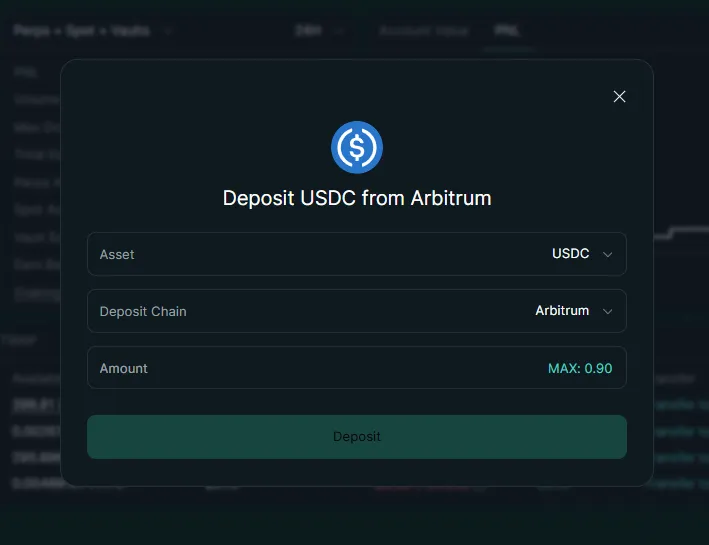 Hyperliquid deposit interface showing USDC amount input and deposit button
5Navigate the Trading Interface
The Hyperliquid trading interface has several key areas:
- Chart - The main price chart in the center. You can switch between TradingView charting modes, timeframes, and indicators.
- Order Book - On the right side, showing real-time bids and asks.
- Order Entry Panel - Below the chart or on the right side, where you place trades.
- Positions & Orders - At the bottom, showing your open positions, pending orders, and trade history.
- Asset Selector - In the top left, letting you switch between trading pairs (BTC-USD, ETH-USD, SOL-USD, etc.).
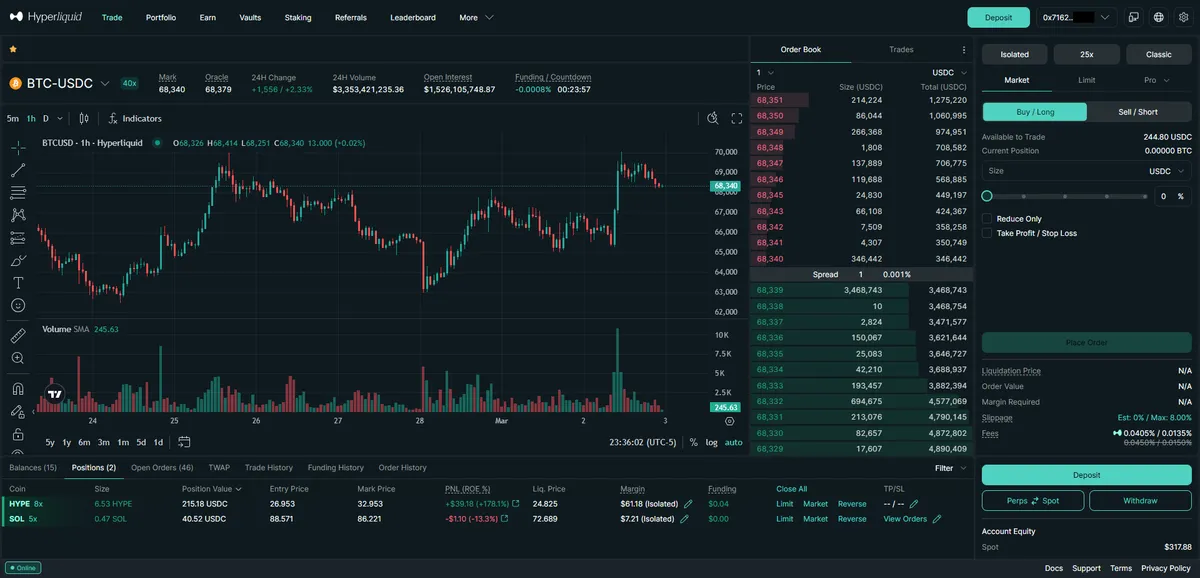 Annotated Hyperliquid trading interface showing chart, order book, order entry, and positions areas
6Place Your First Trade
Let's walk through placing a simple market buy order on BTC-USD:
- Select the market - Click the asset selector and choose BTC-USD (or any market you prefer)
- Set your leverage - Click the leverage indicator and adjust it. Start with 3x or lower if you are new to futures trading (see our full leverage guide for per-asset maximums and cross vs. isolated margin)
- Choose order type - Select "Market" for instant execution. If you are unsure which order type to use, market fills now at whatever the book offers and limit waits for your price
- Enter your size - Type the USD value you want to trade. For example, $100
- Choose direction - Click "Buy / Long" if you think the price will go up, or "Sell / Short" if you think it will go down (see our short selling guide for more on shorting)
- Review the order - Check the estimated entry price, fees, and liquidation price
- Confirm - Click "Place Order" and the trade executes instantly
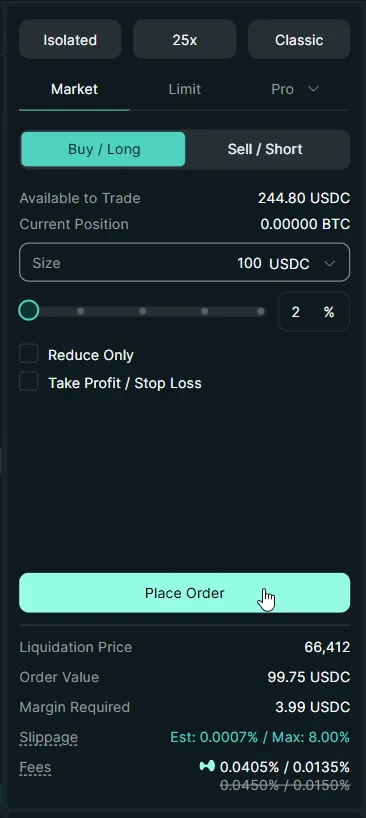 Hyperliquid order entry panel with a market buy order for BTC-USD filled in
Your position now appears in the Positions tab at the bottom of the interface. You can see your entry price, current PnL, margin, and liquidation price in real time.
Start Trading on Hyperliquid
No KYC. No gas fees. Sub-second execution. Get a 4% lifetime fee discount when you sign up through our referral link.
Start Trading NowUnderstanding Order Types on Hyperliquid
Hyperliquid offers a full suite of professional order types. Here is what each one does:
Market Orders
A market order executes immediately at the best available price. Use market orders when you need to enter or exit a position quickly and price precision is less important than speed. Market orders pay taker fees (0.05% base rate).
Limit Orders
A limit order lets you set the exact price at which you want to buy or sell. Your order sits in the order book until the market price reaches your specified price. Limit orders that add liquidity to the book pay maker fees (0.025% base rate), which are half the cost of market orders.
Stop-Loss and Take-Profit Orders
These are conditional orders that trigger when the market price reaches a specified level:
- Stop-Loss - Automatically closes your position to limit losses if the price moves against you
- Take-Profit - Automatically closes your position to lock in profits when the price reaches your target
Always set a stop-loss on every trade. This is the single most important risk management practice.
Advanced Order Types
Hyperliquid also supports:
- Stop Limit - A stop order that places a limit order instead of a market order when triggered
- Scale Orders - Distribute multiple limit orders across a price range
- TWAP (Time-Weighted Average Price) - Split a large order into smaller chunks executed over a window from 5 minutes to 7 days
- Reduce-Only - Orders that can only reduce your position, never increase it
Risk Management: How to Not Lose Your Account
Important
Futures trading with leverage is powerful but dangerous. Follow these rules to protect your capital:
Rule 1: Start With Low Leverage
Just because Hyperliquid offers 40x leverage on BTC does not mean you should use it. Higher leverage means your liquidation price is closer to your entry price, giving you less room for the market to move against you.
| Leverage | Price Move to Liquidation |
|---|---|
| 2x | ~50% |
| 5x | ~20% |
| 10x | ~10% |
| 25x | ~4% |
| 40x | ~2.5% |
Start with 2-5x leverage until you have consistent results.
Rule 2: Always Use Stop-Losses
Every position should have a stop-loss set before or immediately after entry. A good rule of thumb is to risk no more than 1-2% of your total account on any single trade.
Rule 3: Size Your Positions Properly
Do not put your entire account into a single trade. Even if you are highly confident, unexpected events can move markets dramatically. A general guideline is to use no more than 10-20% of your account on any single position.
Rule 4: Understand Liquidation
If the market moves against your position enough that your margin can no longer support it, your position will be liquidated - automatically closed at a loss. You lose your margin for that position. The higher your leverage, the closer your liquidation price.
Hyperliquid shows your liquidation price clearly in the positions panel. Always know where it is. For a full breakdown of liquidation mechanics, formulas, and avoidance strategies, see our liquidation explained guide.
Rule 5: Start Small
Your first trades should be small - $50 to $100 positions. Learn the interface, get comfortable with order types, and develop your strategy before scaling up.
Ready to Trade Smarter?
Apply our referral code when you sign up for a 4% lifetime discount on trading fees. That's savings on every single trade - forever.
Claim Your 4% DiscountWhat I Learned Trading Hyperliquid for the First Time
I've been trading on Hyperliquid since February 2024 — before the HYPE airdrop, before HyperEVM shipped, when the main perp catalog was a fraction of what it is now and the UI was still smoothing out rough edges. A few things surprised me in my first week that no generic crypto tutorial prepared me for.
The first surprise was the order book itself. Coming from a centralized perp venue, I expected a black-box matching engine where the market always "had liquidity" because the exchange could quote in front of users. Hyperliquid's order book is on-chain and visible — meaning I could literally see who was quoting where, and whether a 20-tick gap above the mid was real liquidity or a single market-maker waiting to bid. The first time I tried to dump a $4,000 mid-cap altcoin perp at market, I walked the book three levels deeper than I would have on Binance and the realized slippage was 0.4%, not the 0.05% I'd assumed from looking at the spread. Lesson: check book depth, not just the spread, especially on low-volume altcoin perps and at off-peak hours.
The second was the unified account margin model. I came in assuming "cross margin" meant the same thing it does on a CEX — your entire balance backs every position separately. On Hyperliquid, in the default account mode, cross margin pools across every native perp, every HIP-3 builder market (trade.xyz equity perps, Felix Protocol commodities), and the spot balance. The first time I opened a leveraged short on a meme coin while holding a leveraged long on ETH, both positions shared the same margin pool — meaning a bad day on memes ate into my ETH liquidation buffer. I now run multi-strategy positions in isolated margin until I've actually thought about correlation, and I size cross-margin positions against a single mental "risk envelope" rather than per-trade.
The third was the funding rate as a margin line item, not a fee. Funding settles every hour into your margin balance, not as a separate "fee" line. The first time I held a long crowded perp into a Sunday with funding at +0.05%/hour, I lost ~12% of my margin to funding alone before any price move. CEX traders are used to funding either being announced in advance or showing up as a daily charge — on Hyperliquid the hourly cadence and direct-margin impact compound faster than expected. Watching the projected hourly funding in the position panel is now the first thing I check before holding any leveraged position overnight, and our funding rates explained guide covers the math.
The fourth, smaller but real: there is no "withdrawal email", no "trade confirmation email", no support inbox. The wallet is the account. When I bridged a wrong amount in week one, I had no one to call. That's the trade-off you accept for self-custody. Now I do every deposit and withdrawal with hardware-wallet signing and a small test transaction first.
My Exact First Trade, Click by Click
Beyond the lessons above, here is the literal sequence of what I did the first time I funded an account and opened a position — the specific buttons I clicked, the numbers the panel showed me, and what I watched while the trade was live. If you follow along on app.hyperliquid.xyz, your screen will look the same.
Depositing my first USDC
I had already withdrawn 120 USDC to my Rabby wallet on the Arbitrum network, plus about $0.60 of ETH for gas. After connecting, I clicked the Deposit button in the top navigation. A modal opened with a single USDC amount field and a "Deposit" confirm button — no chain picker, because Hyperliquid assumes Arbitrum. I typed 100 (keeping 20 in reserve so I wasn't all-in on day one), clicked Deposit, and Rabby popped up asking me to approve a USDC spend and then sign the bridge transaction. Two signatures, roughly forty seconds of waiting, and the balance pill in the top-right flipped from $0.00 to $100.00. The thing that caught me off guard: the deposit lands as cross-margin collateral by default, not sitting idly — it's immediately usable as margin across every market.
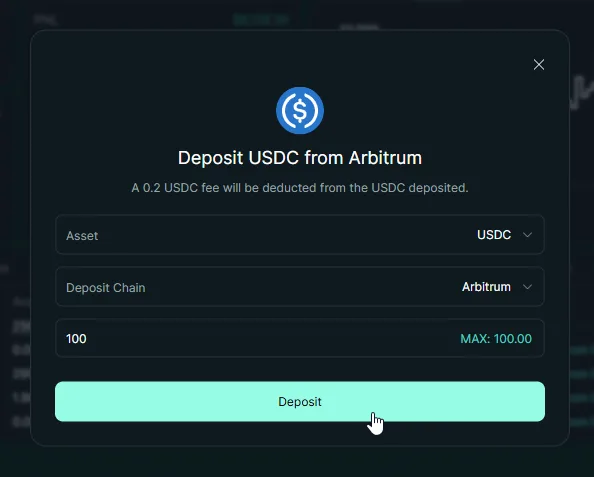
Placing my first perp order
I picked BTC-USD from the asset selector in the top-left. The order entry panel on the right defaulted to Cross margin with the leverage indicator reading 20x — far too high to leave alone. The first thing I did was switch the margin mode to Isolated and dial the leverage down, so that whatever happened, only the margin I committed to this one position could ever be lost — my other balances stayed ring-fenced. I expected BTC to pull back over the next day, so I selected the Sell / Short side, kept it a Market order to fill immediately, and set the Size to about 100 USDC (a small slice of my available balance).
Before I clicked Place Order, the panel showed me three numbers I now check every single time: the order value ($99.53), the margin required ($12.44, the only capital actually at risk in isolated mode), and the liquidation price — about $70,300, comfortably above my entry, which is how it should look for a short. Seeing how little margin was committed, and how far the liquidation price sat from the current price, is exactly why isolated margin is a good default for a first trade. I clicked Place Order, it filled instantly, and the trade moved straight to the Positions tab. No popup, no email.
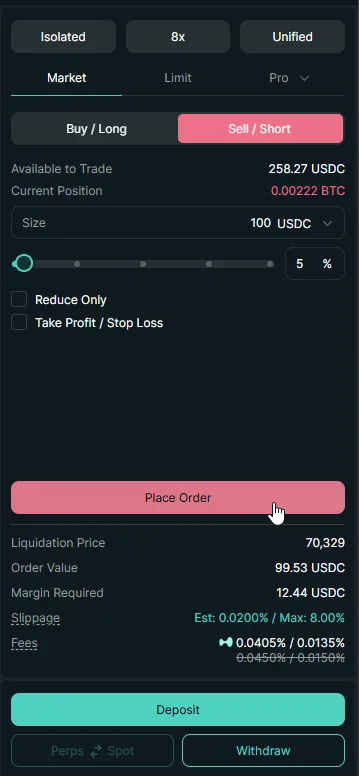
Managing the open position
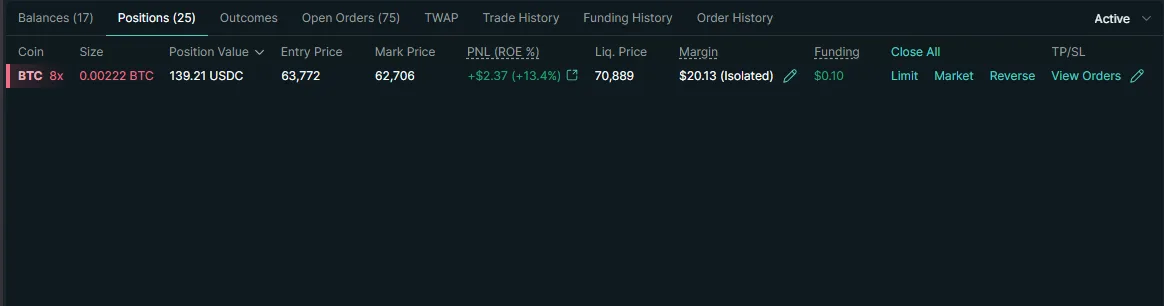
This is the part generic tutorials skip. With the position open, I clicked the position row in the Positions tab and it expanded to show live unrealized PnL (updating tick by tick in green and red), my entry price, the current liquidation price, and a Close button. Two small links sat next to the row: TP/SL. I clicked it and a mini-panel let me attach a take-profit and a stop-loss to the existing position without placing separate orders.
- For the stop-loss, I set a trigger price about 4% above my entry (a short loses when price rises) — sizing it so that if it hit, I'd lose a small, fixed slice of my account, not a scary fraction of the position. The panel previewed the resulting loss in dollars, which made the risk concrete.
- For the take-profit, I set a trigger about 8% below entry, a 2:1 reward-to-risk target.
Both showed up as conditional reduce-only orders under Open Orders, flagged so they can only shrink the position, never flip it. From there I mostly watched the liquidation price line on the chart and the margin ratio in the position panel — as long as the margin ratio stayed low and price stayed well below liquidation, there was nothing to do. That's the discipline: set the bracket, then leave it alone.
Closing it out
I closed manually before my take-profit triggered — BTC had run about 3% in my favor and I wanted to bank the practice trade rather than chase the full target. I clicked Close on the position row, which pre-filled a market order for the exact size to flatten me to zero, confirmed, and the position vanished from the Positions tab. The realized PnL — a small gain, minus the taker fees on the way in and out — settled straight into my USDC balance. Closing a position fully also auto-cancels the attached TP/SL orders, so I didn't have to clean those up. (For more on exits, including partial closes and reduce-only mechanics, see how to close a position.)
The whole loop — deposit, open, bracket, close — took under fifteen minutes and cost me cents in fees. Doing it once at small size taught me more about the interface than any amount of reading.
Common Mistakes New Traders Make on Hyperliquid
Avoid these frequent errors that cost new traders money:
1. Using Too Much Leverage
The number one mistake. New traders see 40x leverage and think it means 40x profits. It also means 40x losses and liquidation from a tiny adverse move. Start at 3x or less.
2. Not Setting Stop-Losses
Without a stop-loss, a single bad trade can wipe out weeks of gains. Always define your maximum acceptable loss before entering a trade.
3. Trading Without a Plan
Before entering any trade, you should know: your entry price, your stop-loss level, your take-profit target, and your position size. If you cannot articulate all four, do not enter the trade.
4. Overtrading
More trades does not mean more profit. Each trade has fees and the potential for loss. Focus on high-conviction setups and be patient.
5. Ignoring Funding Rates
Perpetual futures have funding rates - periodic payments between long and short holders. If you are paying high funding, it eats into your profits over time. Check the funding rate before opening a position.
6. Forgetting to Apply a Referral Code
The referral code must be applied at account creation. If you sign up directly without a referral, you pay full fees forever with no way to apply a discount retroactively. Use our referral code (Concept211) for a 4% lifetime fee discount.
Hyperliquid vs. Centralized Exchanges
If you are coming from Binance, Bybit, or another CEX, here is what changes:
| Feature | Hyperliquid | Centralized Exchanges |
|---|---|---|
| KYC Required | No | Yes |
| Custody | Non-custodial (your wallet) | Custodial (exchange holds funds) |
| Gas Fees | Zero | Varies |
| Order Book | Fully on-chain | Off-chain / centralized |
| Execution Speed | Sub-second | Varies (usually fast) |
| Available Markets | 100+ perps | Hundreds of perps |
| Leverage | Up to 40x | Up to 125x (some exchanges) |
| Account Freeze Risk | None | Possible |
| Regulation | Decentralized protocol | Subject to local regulations |
The biggest practical differences are: no KYC, self-custody of funds, and zero gas fees. The trading experience itself is very similar.
What to Do After Your First Trade
Once you have placed your first trade and understand the basics:
- Explore limit orders - Place a few limit orders to get comfortable with the order book
- Practice with stop-losses - Set stop-losses and take-profits on every position
- Study the funding rates - Learn how funding rates work and how they affect your positions
- Try different markets - Beyond BTC and ETH, explore altcoin perpetuals like SOL and AVAX, plus commodities like oil and silver, and equity perps
- Copy top traders - Not ready to trade solo? Use Hyperliquid vaults and copy trading to mirror experienced traders' strategies
- Explore lending - Put idle USDC to work by lending and borrowing on protocols like Felix and HyperLend
- Enable unified accounts - Simplify margin management with unified accounts, which let you share collateral across spot and perps
- Review your trades - Use the Trade History section to analyze your past trades and learn from wins and losses
- Read our advanced guides - Learn about scale orders, fee optimization, and how to combine them in our Hyperliquid trading strategies guide
- Level up with trading tools - Once you are comfortable with the basics, explore our guide to Hyperliquid trading tools for advanced terminals, analytics, and copy trading platforms that can enhance your experience
Summary
Trading on Hyperliquid takes less than five minutes to set up: connect a wallet, deposit USDC from Arbitrum, and place your first order. You get zero gas fees, sub-second execution, no KYC, and full self-custody - features that no centralized exchange can match simultaneously.
The key steps are:
- Install a wallet (MetaMask, Rabby, or another EVM wallet) and secure your seed phrase
- Get USDC on Arbitrum
- Connect to Hyperliquid (with our referral code Concept211 for 4% off fees)
- Deposit USDC into Hyperliquid
- Place your first trade with low leverage and a stop-loss
Start small, manage your risk, and learn the platform before sizing up. Hyperliquid's interface is powerful, and taking the time to understand each feature will pay dividends.
Start Your Hyperliquid Journey
Join thousands of traders who have already switched to Hyperliquid. Use our referral code for a 4% lifetime fee discount - it cannot be applied after account creation.
Create Your Account - Save 4%Frequently Asked Questions
Hyperliquid is a decentralized exchange with a fully on-chain order book and non-custodial architecture - you maintain control of your funds at all times. It has processed over $500 billion in cumulative trading volume without any security incidents. However, like all DeFi protocols, smart contract risk exists. Never trade with funds you cannot afford to lose.
No. Hyperliquid does not require any identity verification (KYC) to trade. You connect a crypto wallet, deposit USDC, and start trading immediately. This is one of the key advantages over centralized exchanges.
Hyperliquid charges zero gas fees for trading. The only costs are trading fees: 0.025% for maker orders and 0.05% for taker orders at the base tier. You can reduce these further with our referral code, which gives you a 4% lifetime discount on fees.
There is no strict minimum deposit, but you need USDC on the Arbitrum network. The bridge typically requires at least a few dollars in USDC to cover the Arbitrum network gas fee for the bridge transaction. Most traders start with $50-$100 to have enough margin for their first trades.
Yes. Hyperliquid's web interface at app.hyperliquid.xyz works on mobile browsers. You can connect MetaMask Mobile or other mobile wallet apps and even add it to your home screen as a PWA. The experience is responsive and fully functional, though most active traders prefer the desktop interface for charting and faster execution.
Hyperliquid's custom L1 blockchain achieves sub-second block finality, meaning your orders are confirmed in under one second. This is faster than most centralized exchanges and dramatically faster than other decentralized exchanges. The median order latency is approximately 200 milliseconds.
Hyperliquid offers up to 40x leverage on BTC and 25x on ETH, with lower maximum leverage on smaller-cap assets. You can adjust your leverage per position using the leverage slider in the trading interface. New traders should start with low leverage (2-5x) to manage risk.
Five steps. (1) Install a Web3 wallet such as MetaMask or Rabby. (2) Get USDC on the Arbitrum network from a centralized exchange or bridge. (3) Visit app.hyperliquid.xyz with a referral link, connect your wallet, and approve the signature. (4) Click Deposit and bridge USDC into your Hyperliquid account. (5) Pick a market, set leverage, choose order type, enter size, and place the trade. The whole flow takes under 5 minutes.
Yes, with caveats. The interface is more polished than most DEXs and the no-KYC flow eliminates onboarding friction, making it accessible. However, perpetual futures with leverage are inherently high-risk — beginners should start with isolated margin, low leverage (2-5x), small position sizes, and stop-losses on every trade. If you have never traded leveraged products before, spot trading is a safer entry point than perps.
Most Hyperliquid markets enforce a minimum notional order size of $10 (the position value, not the margin). With 10x leverage, that means you need $1 of margin to open the minimum position. Some markets have lower minimums. There is no minimum account balance, but you need at least a few dollars in USDC plus a small amount of ETH on Arbitrum to cover the one-time bridge transaction.
Independent resource: Hyperliquid Guide is an independent, third-party resource operated by Concept211. It is not affiliated with, produced by, reviewed by or endorsed by Hyper Foundation, Hyperliquid Labs or any other Hyperliquid-ecosystem entity. "Hyperliquid" and related names and marks belong to their respective owners and are used here only to identify the platform this site documents. Read the full disclaimer.
Not advice: Nothing on this site is legal, tax, financial or investment advice. Descriptions of regulatory status, tax treatment and market availability are general information that varies by jurisdiction and changes over time. Confirm anything that matters to you with a qualified professional and against primary sources. Trading perpetual futures involves substantial risk of loss, and past performance does not indicate future results.
Disclosure: this site contains referral links. Signing up through the 4% lifetime fee discount link earns us a share of the trading fee Hyperliquid already charges, at no extra cost to you.
Ready to Start Trading?
Join Hyperliquid with our referral link and get a 4% lifetime fee discount. No KYC, no email - just connect your wallet and trade.
Start Trading - Save 4%