How to Buy Crypto With Fiat on Hyperliquid (Credit Card & Bank Transfer)
Table of Contents
- Why This Is a Big Deal
- How to Buy Crypto With Fiat on Hyperliquid
- Supported Payment Methods
- Geographic Availability
- Identity Verification
- Alternative Ways to Fund Your Hyperliquid Account
- 1. Deposit USDC From a Centralized Exchange
- 2. Bridge From Other Chains
- 3. A Note on USDH
- Tips for First-Time Fiat Deposits
- What's Next After Depositing?
 Hyperliquid
One of the biggest barriers to trading on decentralized exchanges has always been the same question: how do I get my money in? Until now, depositing to Hyperliquid required you to already own crypto — typically USDC on Arbitrum — which meant buying on a centralized exchange first, then bridging or withdrawing.
That changes now. Hyperliquid has launched native fiat onramping, powered by  swapped.com. You can deposit directly using a credit card or bank transfer — no existing crypto required. Just select "Fiat" in the deposit modal on app.hyperliquid.xyz and follow the checkout flow.
Info
Fiat onramping is currently in its initial testing phase. Availability varies by geography and payment method. Hyperliquid plans to add offramps, additional payment methods, and support for other onchain assets in the future.
Why This Is a Big Deal
Before fiat onramping, getting money into Hyperliquid looked like this:
- Sign up for a centralized exchange (Coinbase, Binance, Kraken)
- Complete KYC verification (often takes days)
- Buy USDC
- Withdraw USDC to an Arbitrum wallet
- Deposit USDC to Hyperliquid
That's a 5-step process that assumes you already understand wallets, networks, and bridging. For someone new to crypto, it's overwhelming.
Now the process is:
- Connect a wallet to Hyperliquid
- Click Deposit → select Fiat
- Pay with your credit card or bank account
Three steps. No crypto prerequisite. This makes Hyperliquid accessible to anyone with a bank account — not just existing crypto users.
Hyperliquid's fiat onramp removes the biggest barrier to entry for new traders. You can go from zero crypto to live trading in minutes using a credit card or bank transfer.
Start Trading With Fiat
No crypto needed. Deposit with credit card or bank transfer and get a 4% lifetime fee discount.
Open HyperliquidHow to Buy Crypto With Fiat on Hyperliquid
Go to Hyperliquid
Navigate to app.hyperliquid.xyz in your browser.
Connect your wallet
Connect a Web3 wallet like  MetaMask or
  Rabby. If you don't have a wallet yet, check our beginner checklist to set one up in minutes.
Open the deposit modal
Click the Deposit button in the top-right navigation bar.
Select 'Fiat' as the asset
In the deposit modal, choose Fiat as the asset type instead of USDC or other crypto assets.
Choose your payment method
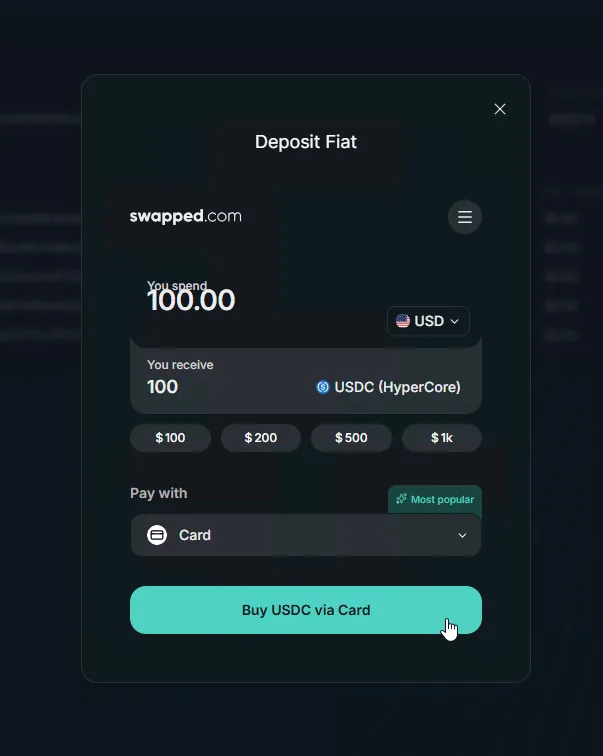
Select credit card or bank transfer. Enter the amount you want to deposit in your local currency.
Complete the checkout
Follow the swapped.com checkout flow. You may need to complete identity verification (KYC) on your first purchase. Once payment is confirmed, funds appear in your Hyperliquid trading account.
Supported Payment Methods
The fiat onramp is powered by swapped.com and currently supports:
| Payment Method | Speed | Availability |
|---|---|---|
| Credit card | Minutes | Select geographies |
| Bank transfer | Varies by bank | Select geographies |
Tip
Credit card deposits are the fastest way to get started — funds typically arrive within minutes. Bank transfers may take longer but often have lower fees.
Geographic Availability
Fiat onramping is available in certain regions. The specific payment methods shown in your deposit modal depend on your location. If you don't see the Fiat option, it may not yet be available in your geography — in that case, use the USDC deposit method instead.
Identity Verification
First-time fiat deposits may require KYC (Know Your Customer) verification through swapped.com. This is a standard regulatory requirement for fiat-to-crypto services and is separate from your Hyperliquid account. You'll typically need:
- A government-issued ID (passport, driver's license)
- A selfie for identity matching
- Basic personal information
Verification is usually completed within minutes.
Alternative Ways to Fund Your Hyperliquid Account
If the fiat onramp isn't available in your region — or you prefer other methods — there are several ways to get funds into Hyperliquid:
1. Deposit USDC From a Centralized Exchange
The most established method. Buy USDC on a centralized exchange like Coinbase, Binance, or Kraken, withdraw it to your Arbitrum wallet, and deposit it to Hyperliquid.
2. Bridge From Other Chains
Already have crypto on Ethereum, Solana, or another chain? Bridge it to Hyperliquid using the built-in bridge or a third-party bridge service.
3. A Note on USDH
USDH, Hyperliquid's original native stablecoin, has sunset under AQAv2 — all USDH-denominated markets on HyperCore have settled. New users should deposit USDC, which is now the aligned quote asset. If you hold leftover USDH, swap it to USDC on the spot order book or 1:1 with no fees via Across.
The native fiat onramp is the simplest path for new users. If it's not available in your region, the CEX → USDC → Deposit path remains the most reliable alternative.
Tips for First-Time Fiat Deposits
- Start small. Make a small test deposit first to verify everything works before committing larger amounts.
- Check fees before confirming. The swapped.com checkout shows all fees before you finalize. Credit cards typically have higher processing fees than bank transfers.
- Use a supported browser. Chrome or Firefox work best. If you encounter issues, try clearing your browser cache or disabling ad blockers.
- Keep your wallet connected. The fiat deposit goes directly to your connected wallet's Hyperliquid account, so make sure you're connected with the right wallet.
- Save your transaction reference. swapped.com provides a transaction reference after payment. Keep this in case you need to contact support about a pending deposit.
Warning
The fiat onramp is in its initial testing phase. If you experience any issues, provide feedback through Hyperliquid's official channels — your input helps improve the service for everyone.
What's Next After Depositing?
Once your fiat deposit lands in your Hyperliquid account, you're ready to trade. Here are the best next steps:
- How to Trade on Hyperliquid — Complete beginner's guide to placing your first trade
- Hyperliquid Beginner Checklist — Make sure you haven't missed any setup steps
- How to Short on Hyperliquid — Learn short selling on perpetual futures
- Hyperliquid Fee Structure — Understand trading fees and how to reduce them
- Is Hyperliquid Safe? — Security overview and risk factors
- Use Hyperliquid on Mobile — Trade on the go from your phone
Frequently Asked Questions
Yes. Hyperliquid now supports fiat onramping via credit card and bank transfer, powered by swapped.com. Select Fiat as the asset in the deposit modal to get started.
The fiat onramp currently supports credit card and bank transfer. Additional payment methods and offramp options are planned for future updates.
Fiat onramping is supported in certain geographies. The availability of specific payment methods depends on your region. Check the deposit modal for options available to you.
Credit card deposits typically process within minutes. Bank transfers may take longer depending on your bank and region. Funds appear in your Hyperliquid trading account once the payment is confirmed.
The fiat onramp provider (swapped.com) may charge processing fees depending on the payment method and amount. These fees are displayed during the checkout flow before you confirm the transaction.
Independent resource: Hyperliquid Guide is an independent, third-party resource operated by Concept211. It is not affiliated with, produced by, reviewed by or endorsed by Hyper Foundation, Hyperliquid Labs or any other Hyperliquid-ecosystem entity. "Hyperliquid" and related names and marks belong to their respective owners and are used here only to identify the platform this site documents. Read the full disclaimer.
Not advice: Nothing on this site is legal, tax, financial or investment advice. Descriptions of regulatory status, tax treatment and market availability are general information that varies by jurisdiction and changes over time. Confirm anything that matters to you with a qualified professional and against primary sources. Trading perpetual futures involves substantial risk of loss, and past performance does not indicate future results.
Disclosure: this site contains referral links. Signing up through the 4% lifetime fee discount link earns us a share of the trading fee Hyperliquid already charges, at no extra cost to you.
Ready to Start Trading?
Join Hyperliquid with our referral link and get a 4% lifetime fee discount. No KYC, no email - just connect your wallet and trade.
Start Trading - Save 4%