Hyperliquid Android App: Official Google Play Download & Setup Guide
Table of Contents
 Hyperliquid
Info
Hyperliquid Is Now on Google Play
- Official Android app available for download on Google Play
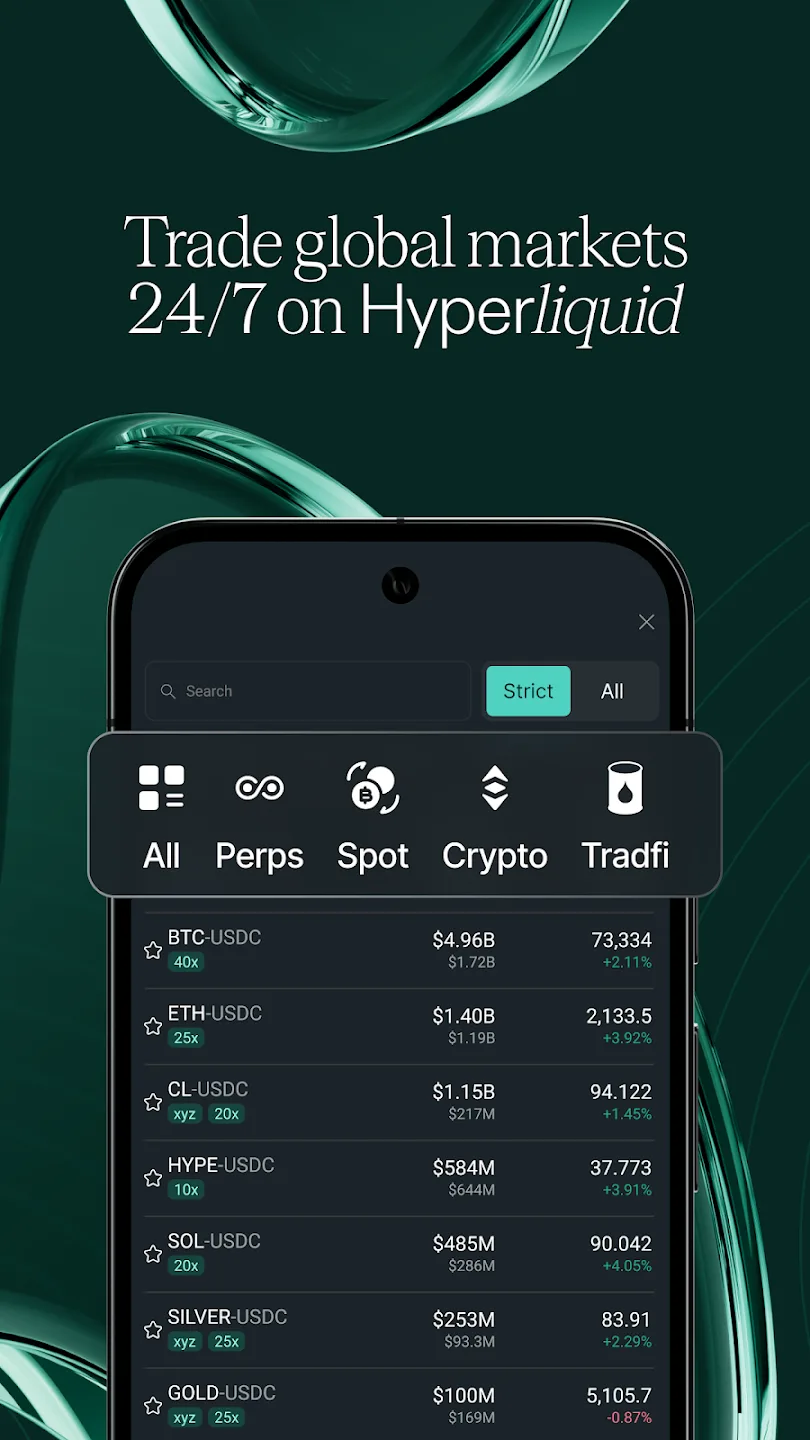
- Full trading interface — perps, spot, crypto, and tradfi markets
- Native push notifications for trade fills — know instantly when your orders execute
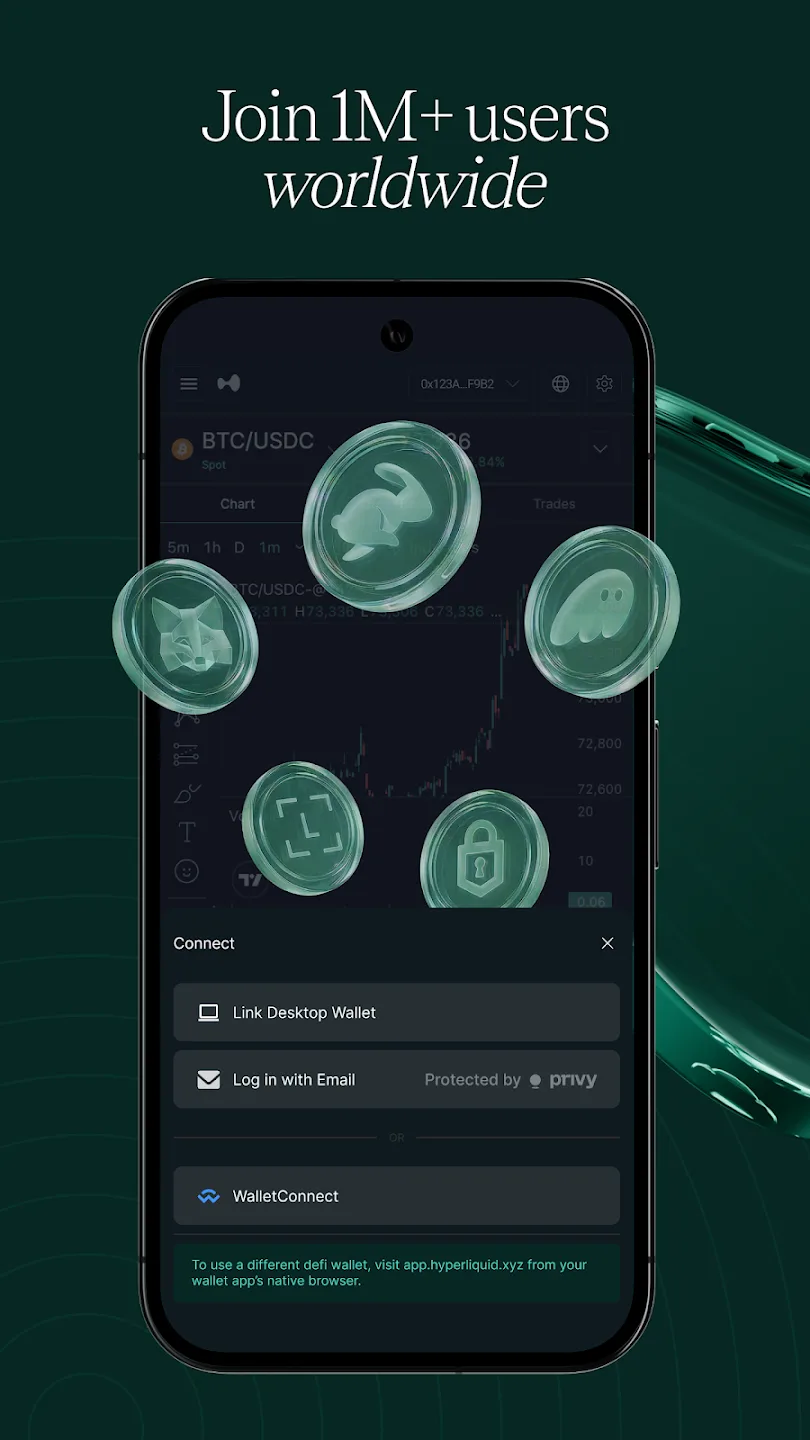
- Connect via desktop wallet link, email (Privy), or WalletConnect
- Self-custody — over $4 trillion traded with no counterparty risk
- No iOS app yet — iPhone users should use the PWA at app.hyperliquid.xyz
Hyperliquid Launches Its First Official Mobile App
After operating exclusively as a progressive web app since launch, Hyperliquid has released its first official native app on the Google Play Store. Android users can now trade directly from a native app with the same full-featured interface available on desktop — plus native push notifications that the PWA cannot deliver.
The app is an initial MVP that the team is intentionally shipping with a focused scope. The headline feature is native Android push notifications for trade fills — instant alerts when your limit orders execute, your positions get filled, or any trade completes on your account. This is something the browser-based PWA cannot do reliably, and it solves one of the most common requests from active traders.
What the App Includes
The Hyperliquid Android app is not a stripped-down companion — it is the full trading platform in a native wrapper. Here is what you get:
Full Trading Interface
- All market types: perpetual futures, spot, crypto, and tradfi markets (stocks, commodities, forex via trade.xyz)
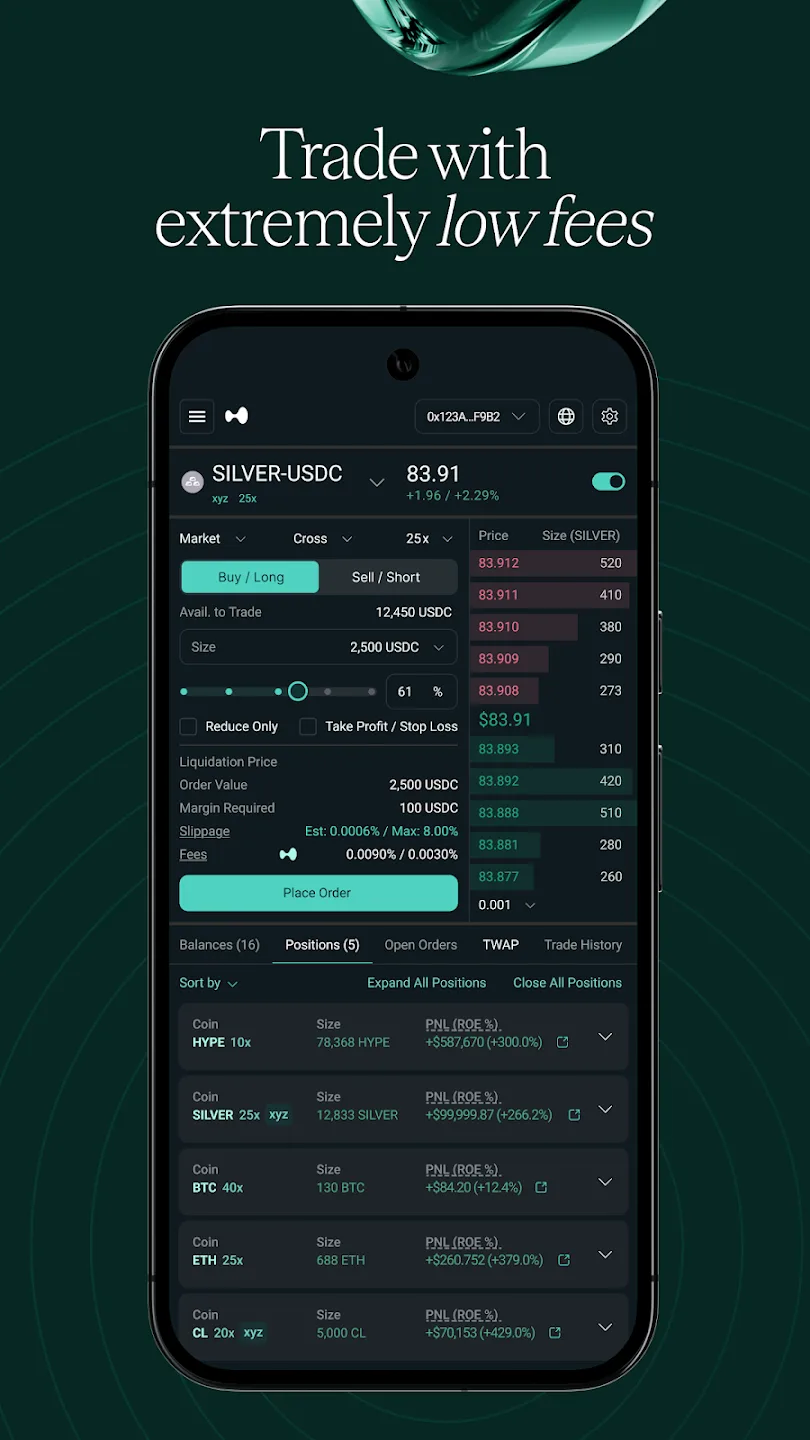
- Complete order book with all order types — limit, market, stop-loss, take-profit, TWAP, and scale orders
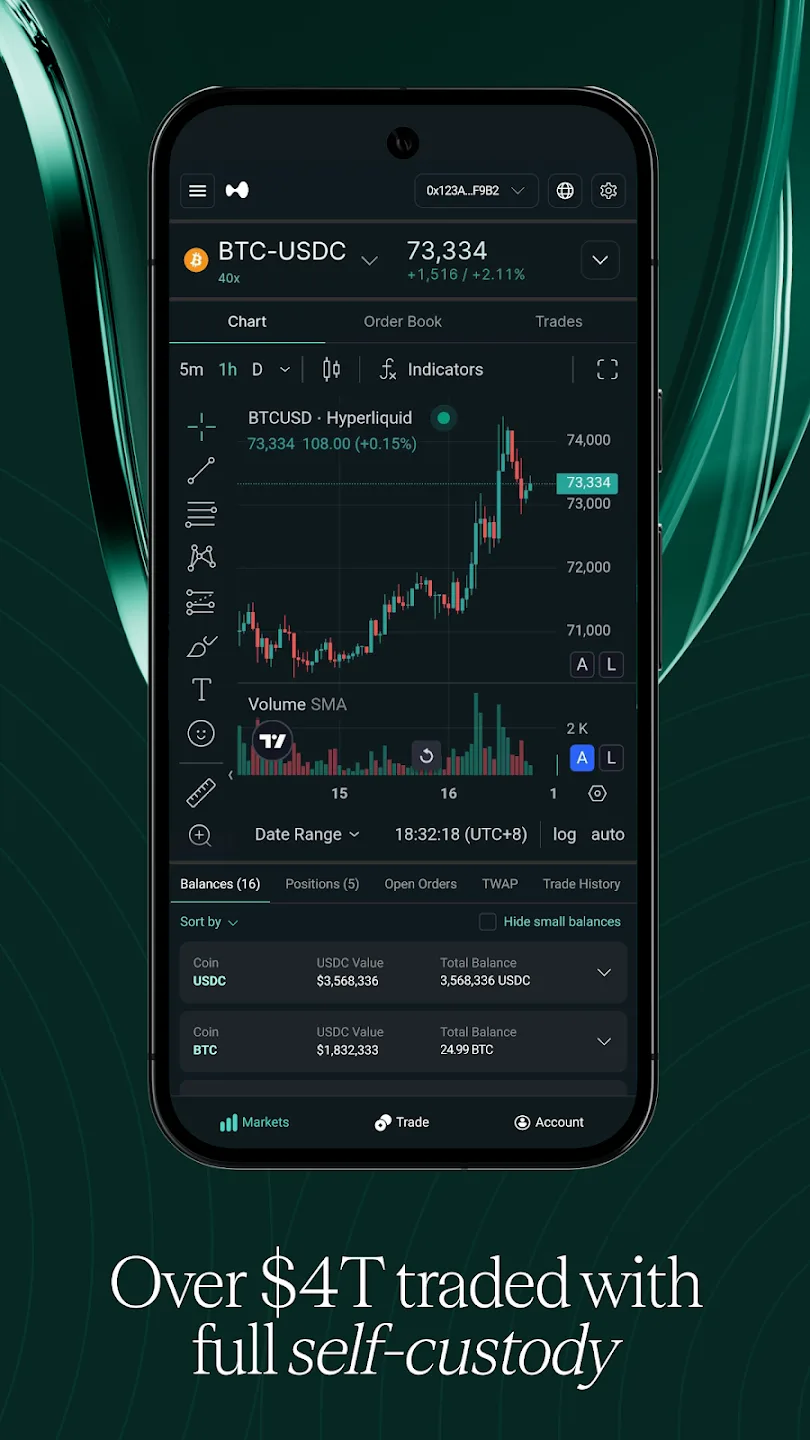
- Real-time TradingView charts with indicators and multiple timeframes
- Portfolio management — balances, open positions, order history, and trade history
Native Push Notifications
- Instant Android notifications when your trades fill
- No need to keep the app or browser open — notifications arrive even when your phone is locked
- Configurable — disable in the app's Settings dropdown or through Android system settings
Wallet Connection Options
- Link Desktop Wallet — pair with your existing browser wallet
- Log in with Email — powered by Privy, no crypto wallet needed
- WalletConnect — connect any compatible mobile or desktop wallet
How to Download and Set Up
Open the official Google Play listing
Go to the official Hyperliquid app page on your Android device. Only use this link — do not search the Play Store manually, as fake listings may appear.
Install the app
Tap Install on the listing page. The app is free and lightweight.
Open the app and connect your wallet
Launch Hyperliquid after installation. You will see three connection options: Link Desktop Wallet (pair with your browser extension), Log in with Email (via Privy — no wallet needed), or WalletConnect. Choose whichever fits your setup.
Enable push notifications
When prompted, allow notifications so you receive instant alerts when your orders fill. You can adjust this later in the app's Settings dropdown.
Start trading
Browse markets across perps, spot, crypto, and tradfi tabs. Place orders, monitor positions, and manage your portfolio — the full app.hyperliquid.xyz experience in a native app.
Start Trading on Hyperliquid
Get a 4% lifetime fee discount when you sign up through our referral link.
Join HyperliquidHow to Avoid Fake Hyperliquid Apps
Warning
Only download Hyperliquid from the official Google Play link. Scammers frequently create fake crypto apps designed to steal your funds or credentials. The official app is at: play.google.com/store/apps/details?id=xyz.hyperliquid.app
Protect yourself by following these rules:
- Never search the Play Store manually for "Hyperliquid" — use only the official link above. Fake listings can appear before the real one
- Do not download APK files from third-party websites, Telegram groups, or Discord servers
- Verify the developer name on the Google Play listing matches the Hyperliquid team
- Do not enter your seed phrase in any mobile app — Hyperliquid never asks for it. Use Link Desktop Wallet, email login, or WalletConnect instead
- If you have already installed a suspicious app, uninstall it immediately and review your wallet for unauthorized activity
For a comprehensive guide to protecting your crypto accounts, read our crypto trading security guide.
Android App vs. PWA — When to Use Each
The Android app and the browser-based PWA both provide the full Hyperliquid trading experience. The key difference is how you access it and what extras you get:
| Feature | Android App | PWA (Browser) |
|---|---|---|
| Full trading interface | ✅ | ✅ |
| All order types | ✅ | ✅ |
| Charts & order book | ✅ | ✅ |
| Portfolio management | ✅ | ✅ |
| Native push notifications | ✅ | ❌ |
| Works on iPhone | ❌ | ✅ |
| No install required | ❌ | ✅ |
| App Store updates | ✅ | Auto-updates |
What to Expect Next
This is the first release of the Hyperliquid Android app, and the team has been clear that it is an initial MVP. The current priority is collecting user feedback on feature prioritization and identifying device-specific issues before expanding the scope.
What we know:
- Additional notification types and improved notification configuration are planned
- The team is iterating based on early feedback — if you encounter issues, report them through the app
- No iOS app has been announced yet, but the Android launch signals the team is investing in native mobile experiences
- The PWA at app.hyperliquid.xyz will continue to be maintained alongside the native app
- Downloads may be limited during the testing period
For the full mobile trading experience including wallet setup tips, interface navigation, and mobile-specific trading strategies, see our comprehensive Hyperliquid mobile guide.
Trade From Anywhere
Access the full Hyperliquid platform from your Android device with a 4% fee discount.
Open HyperliquidNext Steps
- Hyperliquid mobile guide — full PWA setup and mobile trading walkthrough for all devices
- How to trade on Hyperliquid — complete beginner's guide to your first trade
- Order types explained — master every order type available on Hyperliquid
- Deposit USDC — fund your account to start trading
- Trading tools — third-party terminals, analytics, bots, and mobile apps
- Crypto security guide — protect your accounts and devices
Frequently Asked Questions
Yes. Hyperliquid launched an official Android app on Google Play in April 2026. It provides the full trading interface plus native push notifications for trade fills. Download it only from the official listing at https://play.google.com/store/apps/details?id=xyz.hyperliquid.app.
The Hyperliquid Android app gives you the full trading experience — perps, spot, crypto, and tradfi markets — with native push notifications for fills. When your orders execute, you get an Android notification instantly. You can connect via desktop wallet link, email login through Privy, or WalletConnect.
Not yet. As of April 2026, the official Hyperliquid app is only available on Android via Google Play. iPhone users can use the progressive web app at app.hyperliquid.xyz, which can be added to the home screen for an app-like experience via Safari.
Only download from the official Google Play link provided by the Hyperliquid team. Do not trust other app store listings, APK download sites, or links shared in Telegram or Discord groups. Scammers frequently create fake crypto apps to steal funds or credentials.
Yes. Open the app, tap the Settings dropdown, and uncheck Enable Push Notifications. You can also manage notification permissions through your Android system settings.
Independent resource: Hyperliquid Guide is an independent, third-party resource operated by Concept211. It is not affiliated with, produced by, reviewed by or endorsed by Hyper Foundation, Hyperliquid Labs or any other Hyperliquid-ecosystem entity. "Hyperliquid" and related names and marks belong to their respective owners and are used here only to identify the platform this site documents. Read the full disclaimer.
Not advice: Nothing on this site is legal, tax, financial or investment advice. Descriptions of regulatory status, tax treatment and market availability are general information that varies by jurisdiction and changes over time. Confirm anything that matters to you with a qualified professional and against primary sources. Trading perpetual futures involves substantial risk of loss, and past performance does not indicate future results.
Disclosure: this site contains referral links. Signing up through the 4% lifetime fee discount link earns us a share of the trading fee Hyperliquid already charges, at no extra cost to you.
Ready to Start Trading?
Join Hyperliquid with our referral link and get a 4% lifetime fee discount. No KYC, no email - just connect your wallet and trade.
Start Trading - Save 4%