Freqtrade Hyperliquid Guide: Config, API Wallet, Futures and the CCXT Defaults
Table of Contents
 Freqtrade
 is a free, open-source Python trading bot, and it supports Hyperliquid as an exchange. It does not talk to Hyperliquid directly. It goes through CCXT, and that matters for two things most setup guides skip: a referral code and a builder fee that CCXT applies by default. This guide covers the config, the quirks of Hyperliquid's data and margin modes, and how to set those defaults yourself before you go live.
ccxt_config before the first live start, not after.We are not affiliated with Hyperliquid, Freqtrade or CCXT. This is not financial advice, and nothing here implies a strategy will make money.
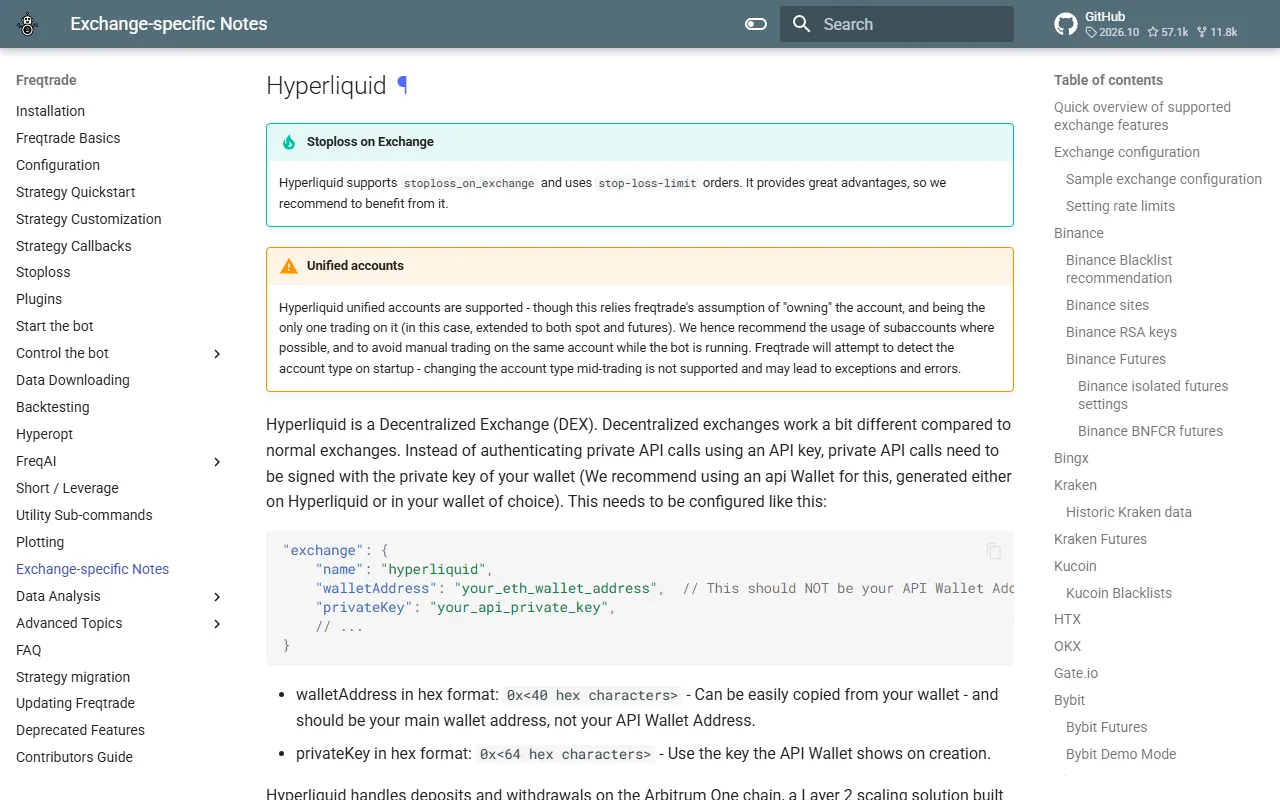 Freqtrade's Hyperliquid exchange notes
Source: Freqtrade, used under fair use for educational purposes
What you need before you start
You need a working Freqtrade install (their docs cover Docker and source setups), a Hyperliquid account, and an API wallet. The API wallet is the important part. Create it in the app under More, then API. It signs orders and cancels for your main account, and it cannot withdraw funds. If the key leaks, an attacker can trade the account but cannot take the money out, which is why Freqtrade recommends it over your main key. Our API guide explains how agent wallets work.
Two addresses are involved, and mixing them up is the most common setup error:
walletAddressis your main account address, the one that holds the funds.privateKeyis the API wallet's private key.
Do not put the API wallet's address in walletAddress. Balances are queried against the main address, so the bot would see an empty account.
If you want a shortcut, our starter bots repository includes python -m scripts.setup_wallet, which creates an API wallet from your main key (asked once, never saved) and writes a .env. You can reuse that API wallet key in Freqtrade. The build page covers the rest of the kit.
The CCXT defaults to settle first
Freqtrade deep-merges the exchange.ccxt_config block into CCXT's settings, so whatever CCXT does by default on Hyperliquid, Freqtrade inherits. Our CCXT guide goes through this in detail. Two defaults matter here. We read them in CCXT's hyperliquid.ts source on November 21, 2026 (CCXT 4.5.93 on PyPI).
The referral code. When CCXT first initializes a client with credentials set, it signs a setReferrer action with options.ref, which defaults to CCXT1. Loading markets with keys present triggers this. Freqtrade removes walletAddress and privateKey from the exchange settings in dry-run, so the call happens the first time you start with dry_run set to false, before your first live order. Errors are swallowed, so you would not see a failure. If your account has no referrer and is still under the referral window, the code becomes your account's referrer.
The builder fee. options.builderFee defaults to on. CCXT asks the account to approve a builder fee for its builder address with a max rate of options.feeRate, which defaults to 0.01%, and then attaches the builder to each order. That fee is paid by you, on top of Hyperliquid's own. Our builder fees explainer covers how the mechanism works in general.
Put 0.01% in context against Hyperliquid's base perp rates of 0.045% taker and 0.015% maker:
| Fill type | Exchange fee | With 0.01% builder fee | Increase |
|---|---|---|---|
| Perp taker | 0.045% | 0.055% | about 22% |
| Perp maker | 0.015% | 0.025% | about 67% |
| Growth-mode maker (about) | 0.003% | 0.013% | more than four times |
That is arithmetic on base-tier rates, before any fee tier. See the fees guide for the full schedule and the growth mode guide for why some markets are so much cheaper.
One detail from our own testing: the builder approval is a user-signed action. On testnet with an API wallet key, the approval did not succeed, CCXT flipped builderFee to false and no fee was charged. Per CCXT's source a main key is meant to approve it, though our testnet run with a main key still showed an approved fee of 0. We did not test on mainnet, so check your own account and look again when you update the library.
Choosing the referral code
Any Hyperliquid referral code gives the trader the same discount: 4% off fees on your first $25M of volume. It never costs you more. The choice is who receives the referrer's share of your fees.
CCXT1is CCXT's default. It supports the library's maintainers.CONCEPT211is Hyperliquid Guide's code. We receive a share of the fees you pay if you use it. That is a financial interest, and you should weigh our recommendation accordingly.- Any other code works too, such as a friend's or your own.
Two facts make the timing matter. In our testnet measurements on November 21, 2026, setReferrer was accepted on accounts that had traded up to about $10,000 lifetime volume (accepted at $42 and $5,990, refused at $12,877). Past that, the API still answers "ok" but records "N/A", permanently. And once a referrer is set, it can never be changed. So if you create the account, add keys to Freqtrade and go live without changing anything, the CCXT default may take the slot before you chose.
We also confirmed on testnet that passing options.ref through CCXT sets the account's referrer to the code you pass. The mainnet default behavior is per CCXT's source, not something we ran.
A complete futures config
Here is a futures config fragment with the CCXT options set. It is dry-run, isolated margin and USDC. Replace the placeholders, and note that strategy settings such as timeframe and stake sizing are left to you.
{
  "trading_mode": "futures",
  "margin_mode": "isolated",
  "stake_currency": "USDC",
  "stake_amount": 20,
  "max_open_trades": 2,
  "dry_run": true,
  "order_types": {
    "entry": "limit",
    "exit": "limit",
    "stoploss": "limit",
    "stoploss_on_exchange": true
  },
  "exchange": {
    "name": "hyperliquid",
    "walletAddress": "0xYourMainAddress",
    "privateKey": "0xYourApiWalletKey",
    "ccxt_config": {
      "options": {
        "ref": "CONCEPT211",
        "builderFee": false
      }
    },
    "pair_whitelist": [
      "BTC/USDC:USDC",
      "ETH/USDC:USDC"
    ],
    "pair_blacklist": []
  }
}
What each piece does:
trading_modeandmargin_mode. Freqtrade supports spot, and futures with isolated or cross margin on Hyperliquid. Our isolated vs cross margin guide explains the difference. Isolated caps the loss on a position at its own margin.stake_currency. USDC, since that is what Hyperliquid perps settle in.ccxt_config.options. Therefcode andbuilderFee: falsefrom the section above. Use whichever code you chose. WithbuilderFeefalse, CCXT still attaches its builder to orders, but at 0%: attribution only, no fee, per its source.pair_whitelist. Pair names use CCXT's format,BTC/USDC:USDCfor the BTC perp.dry_run. Leave it true until you have watched the bot behave on live data.
To check the setup without trading, run the list-pairs command first. It shows the exact pair names Freqtrade sees on the exchange, which saves guessing.
Keep the privateKey out of version control. Freqtrade also reads config values from environment variables and extra config files, so a second config file for secrets is the usual approach.
Stoploss on exchange
Freqtrade's stoploss_on_exchange option is supported on Hyperliquid futures, using stop-loss-limit orders, and Freqtrade recommends it. With it on, the stop sits on the exchange, so it can still trigger if your bot or server goes offline. It is a limit-style stop, so in a fast move it may not fill at the trigger price. Our order types guide covers how stops and limit orders behave on Hyperliquid.
Market orders are simulated
Hyperliquid has no native market order. CCXT simulates one with a limit order priced up to 5% away from the mid price, so it fills like a market order but with a slippage ceiling. In thin books that ceiling is worth knowing about. It is why the example config uses limit entries and exits.
Open a Hyperliquid Account
Accounts opened through our link get 4% off fees on your first $25M of volume. Run Freqtrade in dry-run first, then decide.
Join HyperliquidBacktesting: the data limit
This is the part that surprises people. Hyperliquid's API only returns about 5,000 recent candles and no deeper history. Freqtrade can't download proper historic data for it the way it can on exchanges with years of archives. That leaves two honest options:
- Backtest the recent window. You can backtest on whatever the API still returns. At a 1-hour timeframe, 5,000 candles is roughly 208 days, and at 5 minutes it is under three weeks. A strategy that looks good on that slice has been tested against one short market regime.
- Collect candles going forward. Record the data yourself from today and build your own history over time.
A backtest checks that your logic executes as intended. It does not predict returns, and on a window this short it says even less. A strategy that fit the last few months can fail the next few weeks.
The better test is dry-run on live data. Freqtrade's dry_run runs your strategy on live market data and simulates the fills, with no money at risk. Run it through a range of conditions, not a single calm week, before you move to real size. Also, Hyperliquid's order book updates about every five seconds, so Freqtrade disables the orderbook websocket for it.
Accounts, subaccounts and vaults
Freqtrade supports unified accounts on Hyperliquid, but it assumes it is the only thing trading the account. Its docs recommend a subaccount for the bot so other positions don't interfere with Freqtrade's accounting.
- Subaccount: set
subAccountAddressinccxt_config.options. - Vault: set
walletAddressto the vault address and addvaultAddressinccxt_config.options.
HIP-3 markets
Freqtrade can trade HIP-3 builder-deployed markets. Add the dex name to the exchange block:
"hip3_dexes": ["xyz"]
Each extra dex adds API calls and more rate-limit pressure, so add only the ones you will use. Run freqtrade list-pairs to get the exact pair names. Most HIP-3 markets are isolated-margin only. On November 21, 2026, the live meta for the xyz dex showed 147 markets, 125 of them flagged onlyIsolated. Check that flag in {"type":"meta","dex":"xyz"} before assuming cross margin is available, and read the growth mode guide for the fee side.
A sensible order of operations
- Create the API wallet and note the main address.
- Write the config with
ccxt_config.optionsset,dry_runtrue, and secrets in a separate file. - Run
list-pairsto confirm pair names, then start in dry-run. - Watch the bot on live data across volatile hours. Before going live, check the account's referrer with
python -m scripts.check_accountfrom our starter kit, or with thereferralinfo query shown in our CCXT guide. - Switch to live trading with a small
stake_amountonly after you trust the behavior.
If you would rather build your own bot with a coding agent than configure a framework, the build page and our grid bot guide are the starting points. For strategy ideas that Hyperliquid's mechanics suit, see funding rate arbitrage. If you are new to bots in general, read the trading bot setup guide first.
Start With a Hyperliquid Account
Sign up through our link for 4% off fees on your first $25M of volume. Test on testnet or in dry-run before you risk real funds.
Join HyperliquidRisks and what to check
Bots lose money. A strategy that is profitable on paper can fail live because of fees, slippage, funding, or a regime change. Futures add leverage and liquidation risk. Use testnet or dry-run first, keep size small, keep the API wallet key private, and check the current Freqtrade and CCXT documentation, since both change. This guide reflects them as of November 21, 2026.
Frequently Asked Questions
Yes. Freqtrade lists Hyperliquid as a supported exchange and talks to it through CCXT. It supports spot and futures trading, with isolated or cross margin on futures, and USDC as the stake currency. Freqtrade's docs recommend using an API wallet instead of your main wallet key.
walletAddress must be your main account address, not the API wallet address. privateKey is the API wallet's private key, created at app.hyperliquid.xyz under More, then API. The API wallet can sign orders for the main account but cannot withdraw.
Only on a limited window. Hyperliquid's API returns about 5,000 recent candles and nothing deeper, so Freqtrade can't download proper historic data. You can backtest on that recent window or on candles you collect going forward, and a backtest is a check on logic, not a forecast of returns. Dry-run on live data is the better test.
Freqtrade itself does not, but it inherits CCXT's defaults. Per CCXT's source, builderFee defaults to on with a 0.01% rate when the account approves it. You can turn it off with ccxt_config options builderFee set to false. Check the current CCXT version before you rely on this.
Per CCXT's source, CCXT signs a setReferrer action with the code CCXT1 the first time it loads markets with credentials. Freqtrade strips the keys in dry-run, so this happens on the first live start. If your account has no referrer and has traded under about $10,000, that becomes permanent. Set options ref in ccxt_config before you go live if you want a different code.
Independent resource: Hyperliquid Guide is an independent, third-party resource operated by Concept211. It is not affiliated with, produced by, reviewed by or endorsed by Hyper Foundation, Hyperliquid Labs or any other Hyperliquid-ecosystem entity. "Hyperliquid" and related names and marks belong to their respective owners and are used here only to identify the platform this site documents. Read the full disclaimer.
Not advice: Nothing on this site is legal, tax, financial or investment advice. Descriptions of regulatory status, tax treatment and market availability are general information that varies by jurisdiction and changes over time. Confirm anything that matters to you with a qualified professional and against primary sources. Trading perpetual futures involves substantial risk of loss, and past performance does not indicate future results.
Disclosure: this site contains referral links. Signing up through the 4% fee discount link earns us a share of the trading fee Hyperliquid already charges, at no extra cost to you.
Ready to Start Trading?
Join Hyperliquid with our referral link and get a 4% fee discount on your first $25M of volume. No KYC, no email - just connect your wallet and trade.
Start Trading - Save 4%