Hyperliquid Grid Bot: How Grid Trading Works and a Free Open-Source Bot
Table of Contents
 Hyperliquid
A grid bot places a ladder of buy and sell limit orders around the current price and replaces each one as it fills. It earns the spacing between rungs every time price swings across one. On Hyperliquid the orders can be post-only, so the fee on each fill is the low maker rate. This guide covers how that works, the fee math, how to choose a range from real candle data, and a free open-source grid bot you can run on testnet.
What grid trading is
You pick a lower price, an upper price and a number of levels. The bot spaces the levels evenly, puts buys on the levels below the current price and sells on the levels above it. When a buy fills, it places a sell one level higher. When a sell fills, it places a buy one level lower. Each completed pair, one buy and one sell a rung apart, is a round trip.
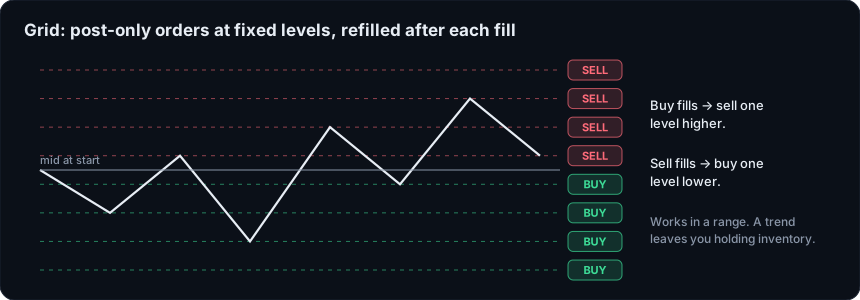 Diagram of a grid: buy orders resting below the price, sell orders above it, each fill re-arming one level over
The bot doesn't predict direction. It sells into rises, buys into dips, and collects the gap each time.
When a grid works and when it fails
It works in a range. If price oscillates between the bounds, every swing across a rung completes a round trip. More chop means more round trips.
It fails in a trend. If price falls through the bottom of the grid, every rung filled on the way down was a buy. You end up long, with the whole ladder filled and nothing left to buy, while the position loses value. A rally through the top does the mirror image on the short side. The grid is not hedged, and the bot is not a stop-loss.
On a perp this matters more than on spot. The inventory you are stuck with is a leveraged position, so a long trend against it can move toward liquidation. Read how liquidation works on Hyperliquid and the leverage guide before you size a grid, and keep the total the grid can accumulate small enough that you would hold it through a bad week.
Warning
Spacing, levels, order size and fees
Three settings interact. The range and the number of levels set the spacing. The order size sets how much each rung is worth. The fee sets the floor under the spacing.
With evenly spaced levels, spacing is the range divided by the number of gaps, which is levels minus one. A round trip earns the spacing and pays a fee on each of its two fills. So:
Profit per round trip = spacing minus two maker fees, both as a percentage of the order's notional value.
Here is a real setup. An 8-level grid across a 4% total range (2% either side of the mid) has 7 gaps, so spacing is 4% / 7 = 0.571%. The fees depend on the market.
| Market | Maker fee | Two fees | Net per round trip on a $100 rung |
|---|---|---|---|
| Native perp, base tier | 0.015% | 0.030% | 0.571% minus 0.030% = 0.541%, about $0.54 |
| HIP-3 growth-mode market | about 0.003% | 0.006% | 0.571% minus 0.006% = 0.565%, about $0.57 |
Those are the base-tier rates from the Hyperliquid fee docs, before any fee tier or staking discount, and not every HIP-3 market runs growth mode, so read the fee line on the market you trade. Our fees guide lists the full schedule, and the growth mode guide explains why those markets are cheaper and what the trade-off is.
Three things follow from the formula.
- Spacing has to clear the fees. If spacing falls below two maker fees (0.030% at the base tier), each round trip loses money even when everything fills perfectly. Packing more levels into a narrow range shrinks spacing, so there is a limit to how dense a grid is worth running.
- More levels is not more profit. Doubling the levels over the same range halves the spacing.
- Order size scales both sides. A bigger rung earns more per round trip and builds inventory faster when price trends. The fee percentage does not change with size at a given tier.
Hyperliquid has no gas fee, so the fee on each fill is the only per-order cost. Orders have a $10 minimum notional.
Why post-only matters
A grid placed with ordinary limit orders can cross the book if price has moved between the moment the bot decides and the moment the order arrives, and that fill pays the taker fee (0.045% at the base tier on native perps). A post-only order, which Hyperliquid calls Alo (add liquidity only), is rejected instead of crossing. It can only rest, so any fill it gets is a maker fill. Our order types guide covers Alo next to the other time-in-force options. The trade-off is that a rejected order leaves a rung unplaced.
Pick a range from live data
The bounds should come from how the market has actually moved, not from a round number. We pulled hourly candles from the Hyperliquid API (candleSnapshot, 1h interval) covering the seven days to November 21, 2026, 17:35 UTC, and measured them.
| Market | 7-day high | 7-day low | High-to-low range | Average hourly range |
|---|---|---|---|---|
| BTC | $66,231 | $55,170 | about 20% | 1.08% of price |
| ETH | $1,866.2 | $1,536.7 | about 21% | 1.30% of price |
The average hourly range is the mean of each candle's high minus low, divided by its close. Those figures are one week's snapshot and they will not hold next week.
What the numbers say about a grid:
- Spacing versus noise. BTC's average hourly candle spanned about 1.08%. A grid with 0.57% spacing, like the example above, would typically see price cross more than one rung in an hour. That activity is what a grid feeds on, as long as price stays inside the bounds.
- A narrow range did not survive the week. The 2% either side range from the example covers 4% in total, against a 20% high-to-low range. BTC's first hourly candle in the window opened at $65,328 and the last closed at $60,086, a drop of about 8%. A grid centered on the start of that week would have been run over: every buy filled on the way down, and the bot would have ended the week long and below its bottom rung.
- A wide range dilutes the spacing. Covering the full 20% with 8 levels gives spacing of about 2.9%, which fills rarely. To keep spacing near 0.5% across 20% you would need around 40 levels, each rung holding a smaller order, and you pay the fee on every fill.
A narrow grid earns often until it breaks. A wide grid is sturdier but fills rarely. Pull the candles yourself before each run, and decide in advance what you will do when price leaves the range. Here is the request:
curl -s https://api.hyperliquid.xyz/info -H "Content-Type: application/json" \
  -d '{"type":"candleSnapshot","req":{"coin":"BTC","interval":"1h","startTime":1763000000000,"endTime":1763700000000}}'
The startTime and endTime are Unix milliseconds. Each candle returns o, h, l, c, v and a timestamp. The API guide covers the rest of the endpoints.
Open a Hyperliquid Account
Accounts opened through our link get 4% off fees on your first $25M of volume. The bots work on testnet before you fund anything.
Join HyperliquidOur free open-source grid bot
We publish a grid bot in our starter bots repository, in bots/grid.py. It is a starting point to learn from and modify, not a strategy with an edge. The build page lists the other starter bots and a quickstart your coding agent can read. We read the file to write this section, and this is what it does.
- Builds the ladder.
--levelsevenly spaced prices from--lowerto--upper, both included. If you leave the bounds out, it uses the mid price plus and minus--range-pctpercent. - Starts clean. It cancels any leftover orders on that market, then places post-only (Alo) buys on every rung below the mid and post-only sells on every rung above it. A rung sitting exactly on the mid is skipped.
- Re-arms on fills. A filled buy at rung
ibecomes a sell at rungi+1. A filled sell at rungibecomes a buy at rungi-1. It confirms a fill against the account's fill history, and an order that vanished without a fill is placed again after a short grace period. At the top or bottom edge of the grid, there is nothing to re-arm. - Skips occupied rungs. If a rung already has a tracked order, it will not place a second one there.
- Caps the position. Every order passes a risk check. Once the position reaches
--max-position-usd, the bot stops adding to it, buys when long and sells when short, and only orders that reduce the position go out. - Stops on a loss limit. If equity drops by
--max-loss-usd, the loop exits. - Cleans up on exit. On Ctrl+C,
--run-secondsexpiry or a stop, it cancels all open orders on the market. The position is left as it is, so you still own whatever the grid accumulated.
The main options:
| Option | What it does | Default |
|---|---|---|
--coin | Market, e.g. BTC, ETH, xyz:XYZ100 | BTC |
--lower, --upper | Grid bounds (pass both, or neither) | mid -/+ range-pct |
--range-pct | Half-width of the default range, in percent | 1.0 |
--levels | Number of grid prices, bounds included | 6 |
--order-usd | Notional per order (minimum $10) | 12 |
--max-position-usd | Stop adding to a position beyond this | 60 |
--max-loss-usd | Stop when equity drops this much | 15 |
--dry-run | Log orders instead of sending them | off |
--run-seconds | Stop after this many seconds (0 = until Ctrl+C) | 0 |
Spacing is arithmetic (equal dollar steps), not percentage steps, so rungs near the bottom are slightly wider in percentage terms than rungs near the top. The bot polls every few seconds, and it does not move the grid or close the position if price breaks out.
Run it on testnet first
You need Python 3.10 or newer and the repo cloned. The setup script creates an API wallet, and the dry run shows the orders without sending them.
python -m scripts.setup_wallet
python -m bots.grid --coin BTC --range-pct 2 --levels 8 --dry-run
The bots default to testnet, so a run with the --dry-run flag removed uses testnet funds. Go to mainnet only after you have watched the bot through volatile hours with small sizes. The repo's README covers the mainnet switch.
We tested it live on Hyperliquid testnet. A 6-level grid of 1% either side on BTC placed 6 resting orders. A much tighter grid, 0.02% either side, filled sells and re-armed buys, which confirmed the re-arm loop. That tight grid was a mechanics test, not a trading setup: at that spacing, fees would eat the rungs. Testnet fills say nothing about mainnet profits, because the order book, spreads and fill behavior differ.
HIP-3 markets work by adding the dex prefix:
python -m bots.grid --coin xyz:XYZ100 --range-pct 1 --levels 6 --dry-run
Check that market's fee line first, and its hours. Some HIP-3 markets track assets that trade on fixed schedules, and a grid left running over a closed session can sit at stale prices.
Referral disclosure
The starter kit applies our referral code to accounts that have none. Under Hyperliquid's referral program, that gives your account 4% off trading fees on your first $25M of volume, and Hyperliquid pays Hyperliquid Guide a share of the fees you pay. You pay less, not more. It never replaces an existing referrer, and it is skipped on testnet. Hyperliquid stops accepting a referrer once an account has traded roughly $10,000, based on our testing. To opt out, set HL_REFERRAL=off in .env.
What this is not
This is not financial advice, and the bot has no proven edge. A grid turns price oscillation into spacing income, and the price of that is trend risk. For quoting both sides continuously, see the market making guide. If you are new to bots, read the trading bot setup guide and the strategies guide first, and keep the starting amount small enough that a full loss would not matter.
Test the Grid on Hyperliquid
Sign up through our link for 4% off fees on your first $25M of volume. Run the bot on testnet first, then decide.
Open a Hyperliquid AccountFrequently Asked Questions
Not as an exchange feature that we could find in the trading interface. Grid trading on Hyperliquid means placing a ladder of limit orders yourself through the API, which is what a grid bot automates. Our open-source starter kit includes one, bots/grid.py, that you can run on testnet first.
They do when they are post-only (Alo). A post-only order is rejected instead of crossing the book, so it can only rest as a maker order. The base perp maker fee is 0.015%. Most trade.xyz HIP-3 markets run growth mode, where the maker fee is about 0.003%.
Wide enough that one rung of spacing is clearly larger than two maker fees, and sized to the range the market has actually traded in. Pull recent candles from the Hyperliquid API, compare the multi-day high and low with the average hourly range, and set the bounds near the range you expect to hold. A breakout through either edge leaves you holding inventory.
Yes. In a sustained trend the grid keeps buying into a falling market, or selling into a rising one, and you end up holding a position that is losing value. On a perp, that position carries leverage and liquidation risk. The starter bot has a position cap and a daily loss stop, but neither removes the risk.
Yes. Pass the market with its dex prefix, for example --coin xyz:XYZ100. Check the live fee line on that market first, because growth-mode markets charge far lower fees than native perps, and check whether the market trades around the clock before you leave a bot running.
Independent resource: Hyperliquid Guide is an independent, third-party resource operated by Concept211. It is not affiliated with, produced by, reviewed by or endorsed by Hyper Foundation, Hyperliquid Labs or any other Hyperliquid-ecosystem entity. "Hyperliquid" and related names and marks belong to their respective owners and are used here only to identify the platform this site documents. Read the full disclaimer.
Not advice: Nothing on this site is legal, tax, financial or investment advice. Descriptions of regulatory status, tax treatment and market availability are general information that varies by jurisdiction and changes over time. Confirm anything that matters to you with a qualified professional and against primary sources. Trading perpetual futures involves substantial risk of loss, and past performance does not indicate future results.
Disclosure: this site contains referral links. Signing up through the 4% fee discount link earns us a share of the trading fee Hyperliquid already charges, at no extra cost to you.
Ready to Start Trading?
Join Hyperliquid with our referral link and get a 4% fee discount on your first $25M of volume. No KYC, no email - just connect your wallet and trade.
Start Trading - Save 4%