Hummingbot Hyperliquid Guide: API Wallet Setup, Testnet and Market Making
Table of Contents
- What you are installing
- Connector IDs: spot, perps and testnet
- Connect with an API wallet, not your main key
- Paper trade on testnet first
- HIP-3 pairs and isolated margin
- The builder code: 0 bps in the client, 1 bp in Condor
- Referral: who gets the share
- Fees for market making
- Practical cautions
- What this is not
 Hummingbot
 is an open-source Python framework for running trading bots, and it has native connectors for Hyperliquid. Its best-known use is market making, which fits an exchange with a 0.015% base maker fee. This guide covers how to install it, which connector ID to use, how to connect with an API wallet instead of your main key, how to paper trade on testnet, and what to know about its builder code, referral choices and fees. We are not affiliated with Hyperliquid or Hummingbot, and everything about Hummingbot below comes from its public docs and repository.
What you are installing
Hummingbot has a few pieces, and it helps to know which one you need.
The Hummingbot client is the terminal app. You start it, connect an exchange, and run a strategy or script. Its quickstart for Docker or source installs lives at hummingbot.org/installation. Condor is Hummingbot's AI harness for running many bots and agents, at condor.hummingbot.org. This guide is about the client, with a note on Condor where its behavior differs.
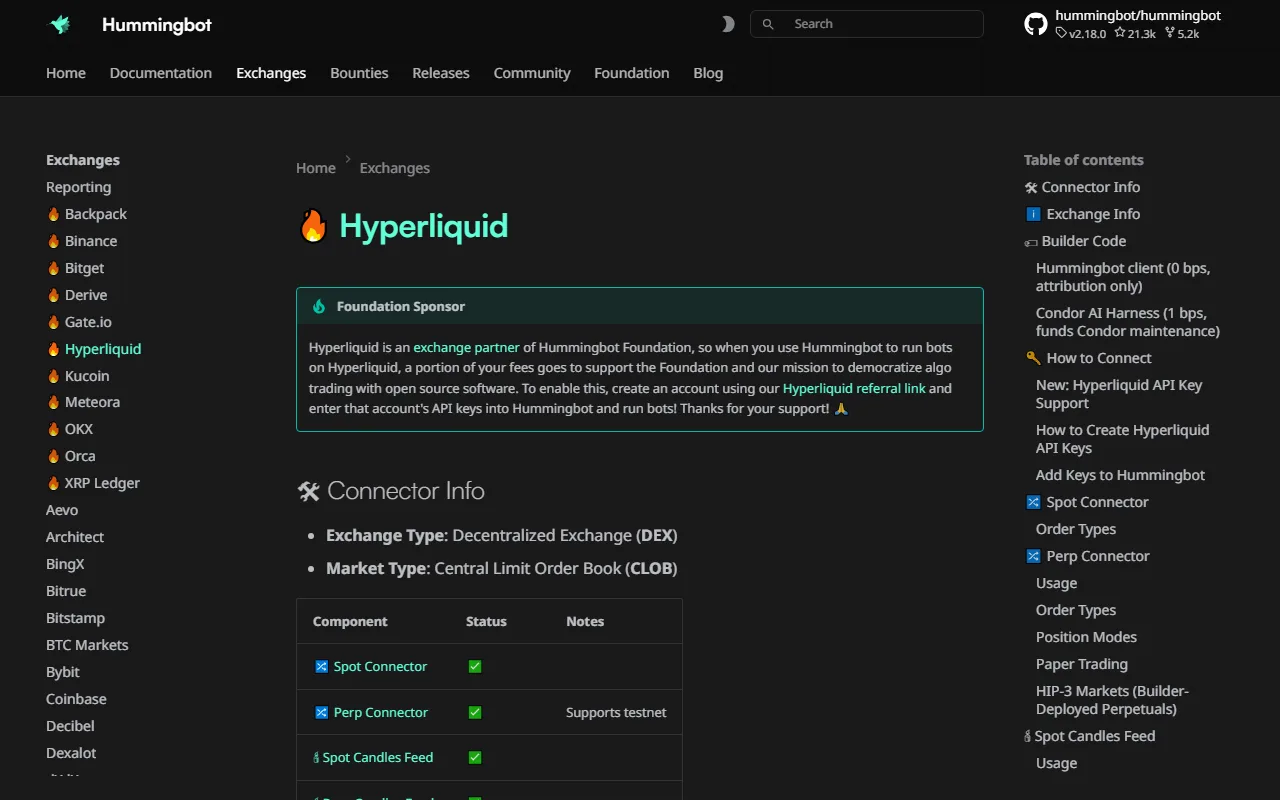 Hummingbot's Hyperliquid connector documentation
Source: Hummingbot, used under fair use for educational purposes
The connector page above is the primary source for most of what follows. It was dated November 11, 2026 when we read it. Connector details change between releases, so check it before you rely on a flag or a prompt.
Connector IDs: spot, perps and testnet
Hyperliquid has three connector IDs in Hummingbot.
| Connector ID | Market |
|---|---|
hyperliquid | Spot |
hyperliquid_perpetual | Perpetual futures |
hyperliquid_perpetual_testnet | Perpetuals on the Hyperliquid testnet |
All of them accept LIMIT, LIMIT_MAKER and MARKET orders, and candle feeds exist for spot and perps. LIMIT_MAKER is the one a market maker cares about, since it is post-only and gets rejected instead of crossing the book. Our order types guide explains the Hyperliquid side of that (it calls post-only Alo). Perps run in one-way position mode, so you hold a single net position per market rather than separate long and short legs.
The docs list a testnet connector for perps only, so the perps testnet is the route for paper trading.
Connect with an API wallet, not your main key
This is the step worth slowing down for. Hummingbot stores the credentials you give it, and a bot is code running unattended. If the key it holds is your main wallet key, a bug, a leaked config file or a compromised machine can empty the account. An API wallet limits that damage.
An API wallet is a second key you approve on Hyperliquid. It can place and cancel orders for your main account, and it cannot withdraw. You create one on the Hyperliquid site under More, then API (direct link: app.hyperliquid.xyz/API). Our API guide walks through the signing model if you want the background.
In the Hummingbot client, start the connection for perps:
connect hyperliquid_perpetual
The dialog asks four things:
- Mode.
arb_walletorapi_wallet. The default isarb_wallet, which expects your main Arbitrum wallet key. Chooseapi_wallet. - Use vault. Yes or No. Answer Yes only if you trade a Hyperliquid vault.
- Address. In api_wallet mode this is your main account address, the one that holds the funds, not the API wallet's address.
- Secret key. In api_wallet mode this is the API wallet's private key.
The address and key mix-up is the most common mistake with any Hyperliquid API client. The API wallet signs, but the account it signs for is the main one. Balances are always read against the main address. Hummingbot also checks at connect time that the API wallet is actually approved for that account, so a wrong pairing fails right away instead of at your first order.
If you would rather not create the wallet by hand, our starter repository has a script for it. Running python -m scripts.setup_wallet creates an API wallet from your main key (asked once, never saved) and writes a .env file. The API wallet key it creates is a normal Hyperliquid API wallet, so you can paste it into Hummingbot's api_wallet prompt. The script has a referral side effect, covered below. Repo: hyperliquid-starter-bots on GitHub, and the build page explains how to use it with a coding agent.
Paper trade on testnet first
Run your first session on hyperliquid_perpetual_testnet. The testnet is at app.hyperliquid-testnet.xyz and its faucet is at app.hyperliquid-testnet.xyz/drip. The faucet needs a past mainnet deposit on the same address, so you cannot get test funds with a brand new wallet.
Connect it the same way:
connect hyperliquid_perpetual_testnet
Use an API wallet there too, and create it on the testnet site, since testnet and mainnet are separate environments with separate approvals. Then run a simple market making script and watch what actually happens: how often your orders fill, how the position drifts, and whether the bot recovers when you restart it.
A testnet run tells you whether the plumbing works. It does not tell you whether a strategy makes money. The order book is thinner and the participants are different, so fill rates and spreads will not match mainnet. Treat a good testnet result as permission to try small on mainnet, nothing more. Hummingbot also omits its builder code on testnet orders, so the fee behavior below only appears on mainnet.
Open a Hyperliquid Account
Accounts opened through our link get 4% off fees on your first $25M of volume. Hummingbot works on testnet before you fund anything.
Join HyperliquidHIP-3 pairs and isolated margin
Hummingbot can trade HIP-3 markets, the builder-deployed markets such as trade.xyz equities and commodities. Per its docs, the pair format is ISSUER:ASSET-QUOTE, and the example given is XYZ:TSLA-USD.
HIP-3 markets are mostly isolated margin only. When we checked the live meta for the xyz dex on November 21, 2026, it listed 147 markets, and 125 of them were flagged onlyIsolated: true: 118 with noCross and 7 with strictIsolated. The other 22 had no flag. So set your bot to isolated margin on HIP-3 pairs, and check the onlyIsolated field in {"type":"meta","dex":"xyz"} for the specific market before you deploy. Our isolated vs cross margin guide explains what the difference does to liquidation risk.
HIP-3 equity and commodity perps keep trading when the underlying market is closed, and price can jump when it reopens. A bot that quotes through a weekend carries that gap risk, which our weekend gaps guide measures.
The builder code: 0 bps in the client, 1 bp in Condor
Hummingbot attaches a builder code to orders. This is the part that surprises people, so here is exactly what its code does, per Hummingbot's own implementation (ticket HGP-87).
Every mainnet, non-vault order carries the builder address 0x10BA451e6439Efc6a17dc20d21121Aa838100705. What it costs you depends on which product you run:
- Hummingbot client: 0 bps. It is attribution only. The client never calls a fee approval, so you are never asked to authorize anything and nothing is charged.
- Condor: you sign an
ApproveBuilderFeeaction for up to 1 bp, and fills then carry 1 bp (0.01% of notional) to fund Condor.
The code takes the lower of your approved maximum and 10 (the unit is tenths of a basis point). With no approval, the fee is zero. The builder code is left off testnet and vault orders.
Compare that with CCXT, whose default builder fee is 0.01% on every order. 0.01% on top of a 0.015% maker fee is a 67% increase in what you pay per fill, so it is worth knowing which tool charges it. Our builder fees explainer covers how builder codes work and how to see what you have approved.
Referral: who gets the share
Hummingbot's connector does not set a referral code on your account. Hummingbot Foundation is a Hyperliquid exchange partner, and its docs ask users to create their Hyperliquid account through its link, app.hyperliquid.xyz/join/HUMMINGBOT, so a portion of trading fees supports the Foundation. That is a reasonable ask from a free, open-source project, and if you want to support it, use that link.
Here is what any referral code does and does not change:
- Any valid code gives you 4% off trading fees on your first $25M of volume. The discount is the same whichever code you use.
- The code decides who receives the referrer share of your fees. It never costs you more.
- A referrer can never be changed once it is set.
Our own link is the site's default one, CONCEPT211, and that is Hyperliquid Guide's code, so we earn a share of fees on accounts that use it. You can see how our code works on the referral page. The choice is yours between supporting Hummingbot Foundation, supporting this site, or neither.
One more detail matters if you already have an account. We tested on the Hyperliquid testnet on November 21, 2026 and found that an account can still get a referrer after it has traded, up to about $10,000 of lifetime volume. A referrer was accepted at $42 and $5,990 of volume and refused at $12,877. Past that point the API still answers "ok" but records no code, permanently. An API wallet can sign the request for its main account. So if you have been trading without a referrer and sit under roughly $10K, you can still pick one, and if you are above it, the option is gone.
Our starter repo's python -m scripts.setup_wallet applies CONCEPT211 to an account that has no referrer. It prints that it did, it never replaces an existing referrer, and setting HL_REFERRAL=off skips it. If you would rather use Hummingbot's code, sign up through its link first, or run our script with HL_REFERRAL=off.
Fees for market making
A market maker lives or dies on fee math, so know the schedule you face. These are the base-tier rates from the Hyperliquid fee docs, before any referral discount, staking discount or volume tier.
| Market | Taker | Maker |
|---|---|---|
| Perps, base tier | 0.045% | 0.015% |
| Spot, base tier | 0.070% | 0.040% |
| trade.xyz HIP-3, growth mode | about 0.009% | about 0.003% |
Two things follow for a bot. First, LIMIT_MAKER orders keep you on the maker side. A market maker quoting both sides pays a fee on each fill, so the spread you quote has to cover two maker fees (0.030% on base-tier perps) before it earns anything. Second, growth-mode HIP-3 markets are far cheaper, but not every HIP-3 market runs growth mode. Outside growth mode, a fee scale of 1.0 produces about 0.09% taker and 0.03% maker, so read the fee line on the exact market. The growth mode guide explains the trade-off.
The Hummingbot client's 0 bps builder code adds nothing to these numbers. If you run Condor with its 1 bp approval, add 0.01% per fill.
Practical cautions
Use a subaccount or a small dedicated account. A bot that quotes continuously will interact with whatever else is on the account. Our unified accounts guide explains how balances combine, which matters when a bot's margin and your manual positions share collateral.
Start with tiny sizes. Orders have a $10 minimum notional. Run at or near that until you have watched the bot through volatile hours, a restart, and a disconnect.
Know what market making risks. Inventory risk means a trending market leaves you long a falling asset or short a rising one, and quoting more aggressively makes it faster. Adverse selection means your resting orders tend to fill when informed traders are about to move price against you. Both can outweigh the spread you earn, and a position on a perp carries leverage and liquidation risk on top. Our market making guide goes through the strategy in depth.
Protect the key. An API wallet cannot withdraw, but it can still trade your account into a loss. Keep the key out of git and screenshots, and revoke it on Hyperliquid if a machine is ever compromised.
Check the docs on the day. The connector page we read is dated November 11, 2026, and Hummingbot ships frequently. Prompts, defaults and fee behavior can change.
If you would rather write the bot yourself, the same build page shows how to do it with a coding agent, and the trading bot setup guide covers the general bot checklist. A simple grid is a gentler first strategy than two-sided quoting, and our grid bot guide includes a free open-source version.
What this is not
This is a setup guide, not a strategy and not financial advice. Hummingbot gives you the machinery to quote a market. It does not give you an edge, and we have no performance figures for any Hummingbot strategy on Hyperliquid, so we do not quote any. Test on the testnet connector, keep sizes small, and only risk what you can lose.
Run Hummingbot on Hyperliquid
Sign up through our link for 4% off fees on your first $25M of volume, then paper trade on testnet before you go live.
Open a Hyperliquid AccountFrequently Asked Questions
Start the Hummingbot client and run connect hyperliquid_perpetual (or connect hyperliquid for spot). It asks for a mode, whether you use a vault, an address and a secret key. Choose api_wallet mode, enter your main account address, and paste the private key of an API wallet created at app.hyperliquid.xyz/API. An API wallet can trade but cannot withdraw.
Spot is hyperliquid, perpetuals are hyperliquid_perpetual, and the perpetuals testnet is hyperliquid_perpetual_testnet. The connectors support LIMIT, LIMIT_MAKER and MARKET orders, and perps run in one-way position mode.
Per Hummingbot's code, the client attaches its builder code to mainnet orders at 0 bps, which is attribution only and never asks you to approve a fee. Condor, the separate harness, asks you to approve up to 1 bp and its fills carry 1 bp to fund Condor. Testnet and vault orders carry no builder code.
No. The connector does not call setReferrer. Hummingbot Foundation's docs ask users to sign up through its link, app.hyperliquid.xyz/join/HUMMINGBOT, so part of the fees supports the Foundation. Any referral code gives you the same 4% off fees on your first $25M of volume. The difference is who receives the referrer share.
There is no guarantee. Market making earns the spread and, at higher tiers, maker rebates, but it carries inventory risk and adverse selection, and a trending market can leave you holding a losing position. Paper trade on the testnet connector first and size small.
Independent resource: Hyperliquid Guide is an independent, third-party resource operated by Concept211. It is not affiliated with, produced by, reviewed by or endorsed by Hyper Foundation, Hyperliquid Labs or any other Hyperliquid-ecosystem entity. "Hyperliquid" and related names and marks belong to their respective owners and are used here only to identify the platform this site documents. Read the full disclaimer.
Not advice: Nothing on this site is legal, tax, financial or investment advice. Descriptions of regulatory status, tax treatment and market availability are general information that varies by jurisdiction and changes over time. Confirm anything that matters to you with a qualified professional and against primary sources. Trading perpetual futures involves substantial risk of loss, and past performance does not indicate future results.
Disclosure: this site contains referral links. Signing up through the 4% fee discount link earns us a share of the trading fee Hyperliquid already charges, at no extra cost to you.
Ready to Start Trading?
Join Hyperliquid with our referral link and get a 4% fee discount on your first $25M of volume. No KYC, no email - just connect your wallet and trade.
Start Trading - Save 4%