Hyperliquid Trailing Stop Orders: How They Work and How to Set One
Table of Contents
- Trailing Stops Are Now Native on Hyperliquid Perps
- What a Trailing Stop Actually Does
- The Two Settings: Retracement and Activation Price
- Retracement
- Activation Price
- Worked Example: The BTC Setup From the Dialog
- How to Set a Trailing Stop on Hyperliquid
- Trailing Stop vs Fixed Stop vs Take-Profit
- Picking the Retracement
- Where the Trailing Stop Fits Among Hyperliquid's Order Types
- Summary
 Hyperliquid
Trailing Stops Are Now Native on Hyperliquid Perps
For a long time, the honest answer to "does Hyperliquid have trailing stops?" was no. You could set a fixed stop-loss, a take-profit, a TWAP or a scale ladder, but if you wanted a stop that moved up behind a winning trade you had to drag it by hand or run a bot to do it for you. Third-party front-ends filled the gap with their own trailing logic layered on top of the API.
On September 21, 2026, Hyperliquid shipped trailing stop orders for perp markets. The trigger price follows the mark price as it moves in your favor, and when the price pulls back from its best level by the distance or percentage you picked, a market order closes the size you selected.
Tip
What a Trailing Stop Actually Does
A regular stop-loss sits at one price and waits. If you buy BTC at 78,845 and set a stop at 76,000, that stop is still at 76,000 whether BTC goes to 79,000 or 95,000. To protect the gains you have to move it yourself.
A trailing stop moves it for you. Instead of a fixed price, you set a distance. The stop sits that distance behind the best price the market has reached since the order went live, and it ratchets in one direction only. When the market makes a new high (for a long), the trigger rises with it. When the market pulls back, the trigger stays put. If the pullback reaches the trigger, the position closes.
The result is a stop that gets tighter in dollar terms as the trade works, without you touching it.
Three details matter about how Hyperliquid's version works, and all three come straight from the order types documentation:
1. It watches the mark price. The same price that triggers TP/SL orders and drives liquidations. The mark price is derived from a blend of oracle and order book inputs rather than any single trade, so a lone wick on the last-trade feed is less likely to knock you out. It also means the trigger can fire when the last trade has not printed the level.
2. The best level is recorded from activation, not from entry. For an order closing a long (or opening a short), the trigger follows the highest mark price reached since the order activated. For an order closing a short (or opening a long), it follows the lowest. The trigger price never moves in the opposite direction.
3. It fires a market order. When the retracement is hit, Hyperliquid places a stop market order for the size you set. You get certainty of execution, and you accept whatever the book gives you on the fill. In a fast market that can be some distance from the trigger. The slippage guide covers how to estimate what that costs on a given market.
The Two Settings: Retracement and Activation Price
Retracement
This is the distance the mark price must pull back from its best level before the stop fires. You can enter it as a percentage or as a fixed price distance. The dialog offers 5% and 10% as quick picks, and you can type your own value.
Percentage is the more portable choice. A 5% trail means the same proportional pullback on BTC as on a small-cap perp. A fixed distance is more natural when you have a concrete level in mind, such as "one daily ATR below the high" or "the width of the range I am trading."
Activation Price
This is optional, and it changes when the tracking starts.
- Without an activation price: the order starts recording the best mark price immediately, from the current mark price at the moment you confirm. If the market goes straight against you from there, the stop fires as soon as the mark price is one retracement below (for a long) the level it was at when you placed the order.
- With an activation price: nothing happens until the mark price reaches that level. Only then does the order begin recording the best price and tracking pullbacks.
The activation price is how you say "don't start protecting this trade until it has actually become a winner." A common pattern is to place the activation price at your first profit target, so the trailing stop takes over exactly where you would otherwise have taken profit.
Warning
Worked Example: The BTC Setup From the Dialog
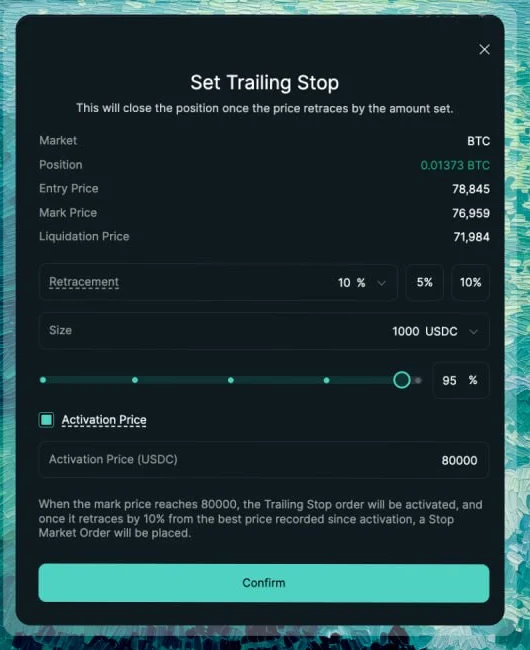
The screenshot above is the clearest way to see all of this at once. The position and settings are:
| Field | Value |
|---|---|
| Market | BTC perp |
| Position | 0.01373 BTC long |
| Entry price | 78,845 |
| Mark price | 76,959 |
| Liquidation price | 71,984 |
| Retracement | 10% |
| Size | 1,000 USDC (95% of the position) |
| Activation price | 80,000 |
Hyperliquid's own summary line at the bottom of the dialog reads: "When the mark price reaches 80000, the Trailing Stop order will be activated, and once it retraces by 10% from the best price recorded since activation, a Stop Market Order will be placed."
So walk it through:
- The position is currently underwater. Mark is 76,959 against an entry of 78,845. The trailing stop does nothing yet because 80,000 has not been reached.
- Say BTC rallies through 80,000. The order activates and records 80,000 as the best price. The trigger is 10% below that: 72,000.
- BTC keeps going to 88,000. Best price is now 88,000, trigger is 79,200. The trade is now protected above entry without anyone touching it.
- BTC pulls back to 84,000. Best price stays at 88,000, trigger stays at 79,200. Nothing fires.
- BTC pushes to 92,000. Best price 92,000, trigger 82,800.
- BTC reverses and the mark price drops to 82,800. The stop fires. A market order sells 1,000 USDC worth of BTC.
Notice what the trader gave up: the trade topped at 92,000 and closed around 82,800, so roughly 10% of the peak gain was handed back. That is the deal with any trailing stop. It cannot know the top until the market has already turned.
Trade Perps With a Fee Discount
Sign up with our referral link and get a 4% discount on Hyperliquid trading fees for your first $25M of volume. That includes the taker fee on every trailing stop that fires.
Get Your 4% DiscountHow to Set a Trailing Stop on Hyperliquid
Open the Positions panel
Go to app.hyperliquid.xyz and scroll to the Positions panel under the chart. Find the perp position you want to protect. Trailing stops are not offered on spot markets.
Open the Set Trailing Stop dialog
Use the trailing stop option on the position row. The dialog opens with the market, position size, entry price, current mark price and liquidation price shown at the top so you can sanity-check the levels before you set anything.
Choose the retracement
Pick 5% or 10% from the quick picks, or enter your own percentage or fixed price distance. This is how far the mark price must pull back from its best level before the stop fires.
Set the size
Enter the amount to close in USDC, or drag the slider to a percentage of the position. You can trail a partial size and leave the rest running with a different exit plan.
Decide on an activation price
Tick Activation Price and enter a level if you want tracking to wait until the market reaches it. Leave it unticked to start tracking from the current mark price immediately.
Read the summary and confirm
The line above the Confirm button describes exactly what the order will do. If it matches your intent, click Confirm. The order appears in your Orders tab and stays live until it triggers or you cancel it.
Trailing Stop vs Fixed Stop vs Take-Profit
| Fixed stop-loss | Take-profit | Trailing stop | |
|---|---|---|---|
| Trigger | Fixed price | Fixed price | Moves with the best mark price |
| Job | Cap the initial loss | Bank a target | Lock in an open-ended gain |
| Fires as | Market or limit | Market or limit | Market |
| Gives back at exit | Nothing (already a loss) | Nothing | One retracement from the peak |
| Needs attention | No | No | No |
| Works before the trade is in profit | Yes | No | Only without an activation price |
None of these replaces the others. The cleanest setup for a directional trade on Hyperliquid is usually all three:
- A fixed stop-loss below entry, sized so the loss is a small fraction of the account. The leverage guide covers how to size that.
- A take-profit on part of the position at a target you would be happy with.
- A trailing stop on the remainder, with an activation price at or above the take-profit level, so the runner is protected without capping how far it can go.
If you are running a trend-following strategy, the trailing stop is the exit. Trend strategies make their money from a few outsized winners, and a fixed take-profit cuts those off. A trailing stop lets the winner run and only closes once the trend has visibly bent.
Picking the Retracement
One question decides it: how much does this market wobble on the way up?
If your trail is tighter than the market's normal pullbacks, you will be stopped out on noise and watch the move continue without you. If it is much wider, you will hand back a large slice of every winner.
Some practical anchors:
- Use volatility, not a round number. Pull up the market on TradingView, add an ATR indicator on your trading timeframe, and set the retracement to a multiple of it. Two to three ATRs is a common starting point for swing trades. That number will be very different for BTC than for a low-cap perp.
- Match the trail to the timeframe. A 1% trail on a 4-hour BTC setup is asking to be stopped on the next candle. A 10% trail on a 15-minute scalp will never fire before the move is over.
- Mind the leverage. Retracement is measured on price, not on your margin. A 5% price pullback is a 50% hit to margin at 10x, and if that pullback also takes the mark price near your liquidation level, the trailing stop is doing less for you than you think. Check the liquidation price in the dialog against the trail.
- Don't fight the funding. On a long-running position the funding rate is eating into the gain the trail is protecting. A trailing stop that holds a position for days should be wide enough to pay for that.
Info
Where the Trailing Stop Fits Among Hyperliquid's Order Types
Hyperliquid's documented order types now cover market, limit, stop market, stop limit, take market, take limit, trailing stop, chase, scale and TWAP, plus the reduce-only, GTC, post-only and IOC flags. A few things are worth knowing about how the trailing stop relates to the rest:
- It is a position tool, not an entry tool, in the app. The dialog is reached from an open position and it closes size. The documentation also describes the trigger logic for orders opening a position (the trigger follows the highest mark for opening a short, the lowest for opening a long), so the primitive is broader than the current dialog exposes.
- It is another trigger order, alongside TP/SL. Positions already carry a take-profit and a stop-loss at the same time, and the trailing stop is set from its own dialog rather than replacing them. Watch the combined size: reduce-side orders that together exceed the position simply close it, and whatever is left over never fills.
- Cross and isolated margin behave the same. The trail is on price. Whether the position sits in cross or isolated margin changes the liquidation math, not the trailing logic.
- API access is not documented yet. As of this writing the exchange endpoint documentation lists only
tpandsltrigger types with a fixedtriggerPx, and no trailing fields. If you are building on the API or running a trading bot, the established workaround is unchanged: track the high-water mark yourself, and cancel and replace a reduce-only stop as the price moves. We will update this page when a native API field appears.
Ready to Put It to Work?
Trailing stops are live on Hyperliquid perp markets. Join with our referral link for a 4% fee discount on your first $25M of volume and set your first one on your next trade.
Join HyperliquidSummary
Hyperliquid trailing stops follow the mark price up behind a long (or down behind a short), never move against you, and fire a market order once the price retraces from its best level by the distance you set. An optional activation price lets you delay tracking until the trade has reached a level of your choosing. They are perp-only and they replace the manual stop-dragging and third-party workarounds that traders used before.
Use them for the part of a trade you want to let run, keep a fixed stop for the initial risk, set the retracement wider than the market's ordinary noise, and remember that what you get out at is a market fill, not the trigger price.
Related reading: every order type on Hyperliquid, how to close a position, leverage and position sizing, and how liquidation works.
Frequently Asked Questions
Yes. Hyperliquid added trailing stop orders for perp markets in September 2026. The trigger price follows the mark price as it moves in the position's favor, and when the mark price retraces from its best level by the distance or percentage you set, a market order is placed for the size you chose. Trailing stops are not available on spot markets.
It watches the mark price, not the last trade price. For a long position the trigger follows the highest mark price reached since the order activated; for a short it follows the lowest. The trigger price only ever moves in the position's favor. When the mark price pulls back from that best level by your retracement amount, the stop fires as a market order.
The activation price is optional. If you set one, the trailing stop stays dormant until the mark price reaches that level, and only then does it start recording the best price and tracking retracements. Without an activation price, tracking begins immediately from the current mark price at the moment you place the order.
A percentage scales with the price, so 5% on BTC and 5% on a small-cap perp both mean the same proportional pullback. A fixed distance is easier to reason about when you have a specific level in mind, such as one ATR or a round number below the recent high. There is no right answer; pick the one that matches how you think about the trade and keep it wider than the market's normal noise.
They solve different problems. A fixed stop-loss caps the initial loss and never moves. A trailing stop locks in gains as the trade works but gives some of them back on the way out, because it only fires after a retracement. Many traders use both: a fixed stop for the initial risk, and a trailing stop added once the position is in profit.
As of September 2026 the public exchange endpoint documentation lists only the tp and sl trigger types with a fixed triggerPx, and no trailing fields. Trailing stops are documented under Hyperliquid's order types and are available in the app. If you need a trailing stop on a bot today, the usual approach is to track the high-water mark yourself and replace a reduce-only stop order as the price moves.
Independent resource: Hyperliquid Guide is an independent, third-party resource operated by Concept211. It is not affiliated with, produced by, reviewed by or endorsed by Hyper Foundation, Hyperliquid Labs or any other Hyperliquid-ecosystem entity. "Hyperliquid" and related names and marks belong to their respective owners and are used here only to identify the platform this site documents. Read the full disclaimer.
Not advice: Nothing on this site is legal, tax, financial or investment advice. Descriptions of regulatory status, tax treatment and market availability are general information that varies by jurisdiction and changes over time. Confirm anything that matters to you with a qualified professional and against primary sources. Trading perpetual futures involves substantial risk of loss, and past performance does not indicate future results.
Disclosure: this site contains referral links. Signing up through the 4% fee discount link earns us a share of the trading fee Hyperliquid already charges, at no extra cost to you.
Ready to Start Trading?
Join Hyperliquid with our referral link and get a 4% fee discount on your first $25M of volume. No KYC, no email - just connect your wallet and trade.
Start Trading - Save 4%